
Arduino Programming for Beginners: Step-by-Step Guide | ETDA
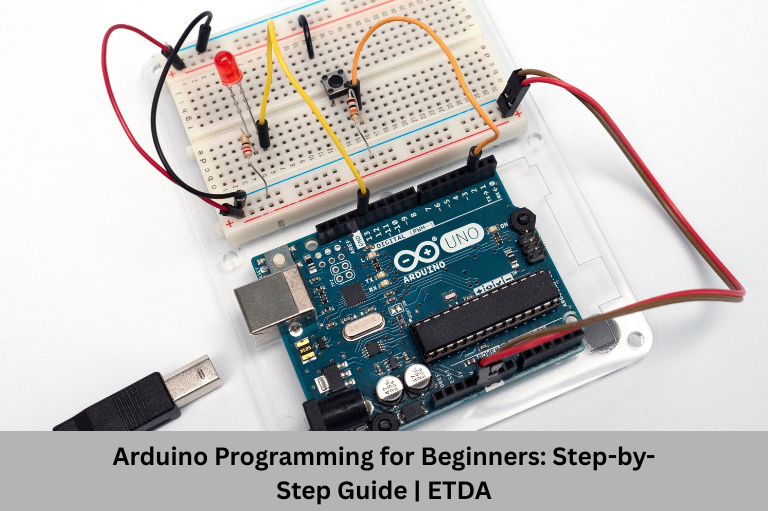
Learn Arduino programming with this beginner-friendly step-by-step guide. Explore Arduino basics, projects, career opportunities, and practical training with Embedded Tech Development Academy (ETDA).
- Arduino Programming for Beginners: Step-by-Step Guide | ETDA
-
Arduino Programming for Beginners: Step-by-Step Guide
- What is Arduino?
- Why Should Beginners Learn Arduino Programming?
- Hardware Components Required
- Installing the Arduino IDE
- Understanding Arduino Program Structure
- Step-by-Step Arduino Programming Guide
- Step 5: Learn Serial Communication
- Understanding Arduino Libraries
- Beginner Arduino Projects to Practice
- Common Mistakes Beginners Should Avoid
- Career Opportunities After Learning Arduino
- Why Choose Embedded Tech Development Academy (ETDA)?
-
Frequently Asked Questions (FAQs)
- Is Arduino suitable for complete beginners?
- Do I need programming knowledge before learning Arduino?
- Which Arduino board should I choose as a beginner?
- What programming language is used in Arduino?
- What kind of projects can I build with Arduino?
- How long does it take to learn Arduino programming?
- Can Arduino help me build a career in embedded systems?
- Why should I choose ETDA for Arduino training?
- What are the career opportunities after learning Arduino?
- Does ETDA provide placement assistance after the Arduino course?
- Conclusion
Arduino Programming for Beginners: Step-by-Step Guide
Arduino has revolutionized the way beginners learn embedded systems and electronics. Its user-friendly programming environment, affordable hardware, and open-source ecosystem make it one of the best platforms for anyone interested in building smart electronic projects. Whether you are an engineering student, diploma holder, hobbyist, or aspiring embedded systems engineer, Arduino provides the perfect foundation to understand how hardware and software work together.
Learning Arduino programming not only teaches coding but also helps you understand electronic circuits, sensors, actuators, communication protocols, and real-world embedded applications. From blinking an LED to building IoT-enabled smart devices, Arduino allows beginners to gain practical experience through hands-on projects.
Today, industries such as automotive, robotics, healthcare, consumer electronics, industrial automation, and IoT actively seek professionals with embedded programming skills. Starting your journey with Arduino makes it easier to transition into advanced platforms like STM32, ARM Cortex microcontrollers, RTOS, and embedded Linux.
If you’re searching for the Top Embedded Training Institute in Bangalore, choosing a practical training program like Embedded Tech Development Academy (ETDA) can help you master Arduino programming through real-time projects, industry-oriented learning, and assured placement support.
What is Arduino?
Arduino is an open-source electronics platform based on programmable microcontroller boards and an easy-to-use software environment called the Arduino IDE. It enables users to develop electronic systems by writing simple programs that interact with hardware components.
Unlike traditional embedded development platforms, Arduino is designed to simplify learning while providing powerful capabilities for prototyping and product development.
It consists of:
- Arduino development boards
- Arduino IDE
- Built-in programming libraries
- Sensors and modules
- Shields for hardware expansion
- Large open-source community
Because of its simplicity, Arduino has become one of the most widely used platforms for learning embedded systems.
Why Should Beginners Learn Arduino Programming?
Arduino removes many of the complexities involved in embedded systems development, making it ideal for first-time learners.
Easy to Learn
Beginner-Friendly Syntax
Simple Programming Structure
Arduino programs are written using simplified C/C++, allowing beginners to understand programming concepts without getting overwhelmed by complex syntax.
The programming structure consists mainly of two functions:
- setup()
- loop()
This makes learning much faster than traditional microcontroller programming.
Affordable Hardware
Arduino boards are inexpensive compared to many professional development kits.
Students can begin learning with minimal investment while still building industry-relevant projects.
Popular beginner boards include:
- Arduino Uno
- Arduino Nano
- Arduino Mega
These boards are suitable for hundreds of practical applications.
Huge Learning Community
One of Arduino’s biggest strengths is its active global community.
Beginners can access:
- Tutorials
- Forums
- GitHub repositories
- Video lessons
- Sample projects
- Open-source libraries
Whenever you encounter a problem, chances are someone has already solved it.
Hardware Components Required
Before writing your first Arduino program, you’ll need a few basic electronic components.
Low Power Modes
Arduino Uno
Best Choice for Beginners
Breadboard
USB Cable
Used for powering the board and uploading programs from the computer, enabling easy programming, debugging, testing, and reliable communication with Arduino.
LEDs and Resistors
These are the first components beginners use to understand digital output programming, circuit connections, hardware control, and fundamental embedded system concepts.
Push Buttons
Push buttons help learners understand digital inputs, conditional programming, user interaction, input handling, and real-time embedded system control concepts.
Sensors
As you progress, you’ll work with sensors such as:
- Temperature sensors
- Ultrasonic sensors
- IR sensors
- LDR modules
- Motion sensors
- Humidity sensors
These devices help create interactive embedded applications.
Installing the Arduino IDE
The Arduino Integrated Development Environment (IDE) is where you’ll write, compile, and upload your programs.
Installation Steps
Step 1 – Download the IDE
Download the latest version compatible with your operating system.
Step 2 – Install the Software
Follow the installation wizard and complete the setup.
Step 3 – Connect the Arduino Board
Use the USB cable to connect the board to your computer.
Step 4 – Select the Correct Board
Choose the appropriate Arduino board from the Tools menu.
Step 5 – Select the COM Port
Ensure the correct communication port is selected.
Step 6 – Upload Your First Program
Once everything is configured, you’re ready to upload your first sketch.
Understanding Arduino Program Structure
Every Arduino sketch follows a standard structure.
setup() Function
The setup() function executes only once whenever the Arduino powers on or resets.
Typical tasks include:
- Initializing digital pins
- Configuring communication protocols
- Setting baud rates
- Initializing sensors
loop() Function
The loop() function runs continuously after setup() completes.
Most application logic is written here.
Examples include:
- Reading sensors
- Controlling LEDs
- Operating motors
- Sending serial data
- Monitoring switches
Understanding these two functions is the foundation of Arduino programming.
Step-by-Step Arduino Programming Guide
Step 1: Learn Digital Outputs
The first project most beginners build is an LED blinking circuit.
This project teaches:
Digital Pin Configuration
Key Concepts
- HIGH and LOW logic
- Output pins
- Time delays
- Program execution flow
Although simple, this project introduces the core concepts used in almost every embedded application.
Step 2: Learn Digital Inputs
After controlling outputs, the next step is reading digital inputs.
You’ll learn how to:
- Detect button presses
- Execute conditional statements
- Respond to user interaction
This helps you understand how embedded systems respond to external events.
Step 3: Analog Inputs
Unlike digital signals, analog signals can have multiple values.
Arduino can read analog data from:
- Potentiometers
- Temperature sensors
- Light sensors
- Gas sensors
Learning analog programming prepares you for real-world embedded systems where sensor data plays a critical role.
Step 4: PWM Programming
Pulse Width Modulation (PWM) enables Arduino to simulate analog outputs.
Applications include:
- LED brightness control
- Motor speed control
- Servo positioning
- Fan speed regulation
PWM is widely used in robotics and automation projects.
Step 5: Learn Serial Communication
Serial communication is one of the most useful features in Arduino programming. It allows the Arduino board to exchange data with a computer or other devices, making debugging and monitoring much easier.
Why Serial Communication is Important
Common Applications
Practical Uses
- Display sensor readings
- Debug program errors
- Monitor system performance
- Communicate with external modules
- Send and receive commands
Learning serial communication is an essential skill before moving on to advanced embedded systems and IoT projects.
Understanding Arduino Libraries
One of the reasons Arduino is beginner-friendly is its extensive collection of built-in and third-party libraries. Libraries simplify programming by providing ready-made functions for controlling hardware components without writing complex code from scratch.
Popular Arduino Libraries
Frequently Used Libraries
Examples
- Servo Library
- LiquidCrystal Library
- Wire Library (I2C)
- SPI Library
- SoftwareSerial Library
- Wi-Fi Libraries
- Bluetooth Libraries
Using these libraries helps beginners develop projects faster while learning industry-standard programming practices.
Beginner Arduino Projects to Practice
Practical projects are the best way to improve your programming and hardware skills. Every project introduces new concepts while strengthening your understanding of embedded systems.
Simple Projects for Beginners
LED Blinking Project
Traffic Light Controller
This project helps you understand sequencing, timers, conditional logic, program flow, hardware control, and real-world embedded system implementation.
Automatic Street Light
Temperature Monitoring System
Read temperature data from a sensor and display it through the Serial Monitor or an LCD display for real-time environmental monitoring applications.
Ultrasonic Distance Measurement
Measure the distance of nearby objects using an ultrasonic sensor, a popular project for learning robotics, automation, obstacle detection, and sensor interfacing.
Smart Home Automation
Control electrical appliances using relays and Bluetooth or Wi-Fi modules, introducing the basics of IoT.
These projects build confidence and prepare you for more advanced development platforms such as STM32 and ARM Cortex microcontrollers.
Common Mistakes Beginners Should Avoid
Programming Mistakes
Typical Errors
: Examples
- Missing semicolons
- Incorrect variable declarations
- Wrong pin assignments
- Infinite loops
- Improper logic implementation
Hardware Mistakes
Common hardware issues include:
- Loose breadboard connections
- Incorrect resistor values
- Reversed LED polarity
- Incorrect sensor wiring
- Power supply issues
Developing debugging skills is just as important as learning programming, as it helps you identify and fix problems efficiently.
Career Opportunities After Learning Arduino
Arduino programming is often the first step toward a rewarding career in embedded systems. Once you master Arduino, transitioning to professional embedded platforms becomes much easier.
Popular Career Roles
Embedded Systems Engineer
IoT Developer
Create smart devices connected through the internet using sensors and communication modules for real-time monitoring, automation, data exchange, and IoT applications.
Robotics Engineer
Automation Engineer
Build automated industrial systems that improve manufacturing efficiency, enhance productivity, reduce operational costs, and ensure reliable, real-time process control and monitoring.
Electronics Design Engineer
Work on hardware design, PCB development, and embedded software integration.
With continuous advancements in IoT, electric vehicles, healthcare technology, and industrial automation, professionals with embedded programming skills are in high demand.
Why Choose Embedded Tech Development Academy (ETDA)?
Learning Arduino through self-study is possible, but structured training provides the practical exposure needed to become job-ready.
If you’re searching for the Top Embedded Training Institute in Bangalore, Embedded Tech Development Academy (ETDA) offers industry-oriented embedded systems training designed to bridge the gap between academic knowledge and industry requirements.
What Makes ETDA the Right Choice?
Comprehensive Curriculum
Learn Arduino programming along with Embedded C, STM32, ARM Cortex, RTOS, IoT, communication protocols, and embedded Linux through a structured learning path.
Hands-On Practical Labs
Gain real-time experience by working with Arduino boards, sensors, communication modules, and embedded development kits in well-equipped laboratories.
Live Industry Projects
Build practical projects that strengthen your technical portfolio and prepare you for real-world embedded systems development.
Expert Trainers
Learn from experienced industry professionals who provide practical insights, technical mentoring, and interview guidance.
Interview Preparation
Receive complete career support, including resume building, aptitude training, mock interviews, technical interview preparation, and soft skills development.
Assured Placement Support
Embedded Tech Development Academy (ETDA) provides assured placement support, helping students connect with leading embedded systems and electronics companies. Dedicated placement assistance ensures learners are well-prepared for technical interviews and career opportunities.
Whether you are a student, fresher, or working professional, ETDA helps you develop the practical skills employers expect from embedded engineers.
Frequently Asked Questions (FAQs)
Is Arduino suitable for complete beginners?
Yes. Arduino is specifically designed for beginners and offers an easy-to-use programming environment, making it an excellent starting point for learning embedded systems.
Do I need programming knowledge before learning Arduino?
No. While basic computer knowledge is helpful, most Arduino courses teach programming fundamentals alongside practical electronics.
Which Arduino board should I choose as a beginner?
The Arduino Uno is the best choice for beginners because of its simplicity, affordability, and wide community support.
What programming language is used in Arduino?
Arduino programming is based on C/C++, making it an excellent foundation for learning Embedded C and advanced firmware development.
What kind of projects can I build with Arduino?
You can build projects such as LED controllers, home automation systems, weather monitoring devices, obstacle detection robots, smart irrigation systems, and IoT-based applications.
How long does it take to learn Arduino programming?
With consistent practice, beginners can learn Arduino basics in a few weeks. Developing industry-ready skills generally takes two to three months of hands-on learning.
Can Arduino help me build a career in embedded systems?
Yes. Arduino provides a strong foundation in embedded programming, hardware interfacing, and electronics, making it easier to transition into advanced embedded technologies and professional roles.
Why should I choose ETDA for Arduino training?
Embedded Tech Development Academy (ETDA) offers hands-on training, experienced faculty, live embedded projects, industry-relevant curriculum, interview preparation, and assured placement support, making it an excellent choice for aspiring embedded engineers.
What are the career opportunities after learning Arduino?
After learning Arduino, you can pursue careers as an Embedded Systems Engineer, Firmware Developer, IoT Developer, Robotics Engineer, Automation Engineer, or Electronics Design Engineer.
Does ETDA provide placement assistance after the Arduino course?
Yes. ETDA provides assured placement support, including resume building, mock interviews, technical guidance, and placement assistance to help students secure opportunities in leading embedded systems and electronics companies.
Conclusion
Arduino is one of the best platforms for beginners who want to enter the world of embedded systems. Its simple programming environment, affordable hardware, and extensive community support make learning both enjoyable and practical. By following a structured, step-by-step approach, you can build a strong understanding of programming, electronics, hardware interfacing, and real-world project development.
As your confidence grows, Arduino serves as a stepping stone to advanced technologies such as STM32, ARM Cortex microcontrollers, IoT, robotics, and industrial automation.
If you’re looking for the Top Embedded Training Institute in Bangalore, Embedded Tech Development Academy (ETDA) offers practical Arduino and embedded systems training with experienced trainers, real-time projects, industry-oriented curriculum, and assured placement support to help you build a successful career in embedded systems.
Author: ETDA Trainers
Experience: 10+ Years of Industry Experience in Embedded Systems, IoT, and Embedded C Programming