
Enterprise Linux Architecture: Kernel and Boot Process
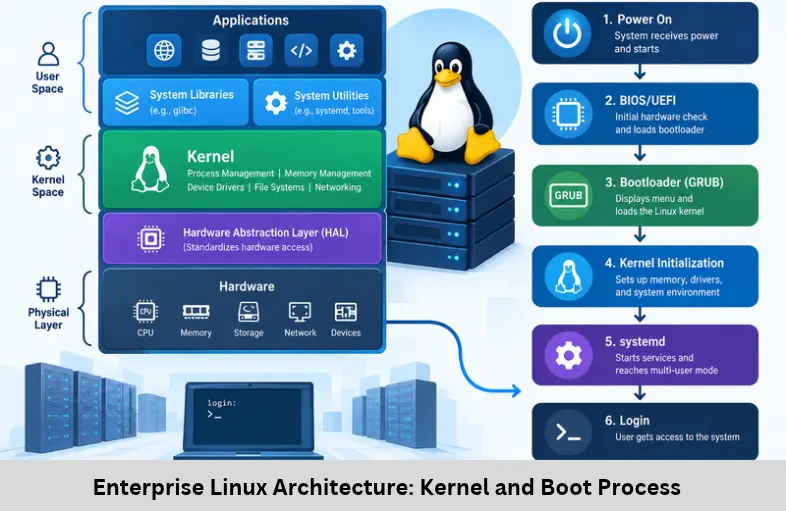
Explore Enterprise Linux architecture, Linux kernel structures, memory management, device drivers, GRUB2, initramfs, systemd, and the complete boot process. Embedded Tech Development Academy (ETDA).
- Enterprise Linux Architecture: Kernel and Boot Process
-
Enterprise Linux Architecture: Kernel Structures and System Boot Process
- Introduction to Enterprise Linux Architecture
- Overview of Enterprise Linux Architecture
- Linux Kernel Architecture and Core Structures
- File Systems, Device Drivers, and Networking
- Enterprise Linux Boot Process: From Power-On to User Space
- Why Enterprise Linux Architecture Matters
- Frequently Asked Questions
- Conclusion
Enterprise Linux Architecture: Kernel Structures and System Boot Process
Introduction to Enterprise Linux Architecture
Enterprise Linux is a reliable operating system foundation for mission-critical environments, including cloud computing platforms, enterprise servers, data centers, virtualization infrastructure, and industrial embedded systems. Its stability, scalability, security, and performance come from the interaction between hardware, the Linux kernel, system libraries, background services, and user-space applications. Understanding Linux kernel architecture, kernel data structures, process scheduling, virtual memory management, device drivers, and the Linux boot sequence is essential for system administrators, embedded Linux engineers, DevOps professionals, and software developers.
Enterprise Linux distributions such as Red Hat Enterprise Linux (RHEL), SUSE Linux Enterprise Server, Ubuntu Server, and Oracle Linux build on the Linux kernel with distribution-specific tools, security policies, package management, and enterprise support. From firmware initialization and GRUB2 bootloader execution to kernel initialization, initramfs, and systemd service startup, every stage contributes to a functional operating system.
For learners interested in Linux internals and embedded development, Embedded Tech Development Academy (ETDA) provides an opportunity to explore operating system fundamentals and practical technical concepts. As a Top Embedded Training Institute in Bangalore, Embedded Tech Development Academy (ETDA) focuses on industry-oriented learning and offers assured placement support to help learners prepare for relevant technical career opportunities.
Overview of Enterprise Linux Architecture
Linux follows a layered architecture that separates hardware operations from application logic while allowing efficient communication between components.
Key Architectural Layers
Hardware layer: Includes CPUs, RAM, storage devices, network interfaces, and peripheral controllers.
Kernel layer: Manages processes, memory, device access, networking, and security enforcement.
System libraries: Libraries such as glibc provide APIs that applications use to request operating system services.
System services: Background components, including systemd, SSH services, and scheduled jobs, support system operations.
User space: Hosts applications such as databases, web servers, containers, monitoring tools, and enterprise software.
Kernel Space and User Space
Kernel space has privileged access to system resources, whereas user-space applications operate with restricted permissions. Applications typically request kernel services through system calls such as open(), read(), write(), and fork().
This separation improves system stability and security by limiting direct hardware access and isolating application failures from core operating system operations.
Linux Kernel Architecture and Core Structures
The Linux kernel uses a monolithic architecture with modular capabilities. Major operating system services run in kernel space, while loadable kernel modules allow supported functionality, including many device drivers and file systems, to be added or removed dynamically.
Process Management and Scheduling
Linux represents each task using the task_struct data structure. It stores information such as process identifiers, execution state, scheduling attributes, memory references, and relationships with other tasks.
The scheduler selects runnable tasks for CPU execution. Modern Linux kernels use scheduling mechanisms that have evolved beyond the original Completely Fair Scheduler (CFS), including the EEVDF scheduling approach for fair-scheduling workloads in recent kernel versions.
Process States and Context Switching
Tasks can be running, runnable, sleeping, or stopped, among other states. During a context switch, the kernel saves the execution state of one task and restores another task’s state, allowing multiple processes to share CPU resources.
This is important for enterprise servers handling concurrent database requests, network connections, and background jobs.
Memory Management
Linux uses virtual memory to provide processes with separate address spaces and to manage physical RAM efficiently.
Important components include:
Page tables: Translate virtual addresses into physical memory locations.
Paging: Manages memory in fixed-size units called pages.
Swapping: Can move selected memory pages to storage when configured and appropriate.
Slab allocation: Uses kernel object caches to reduce the overhead of frequently allocating and freeing objects.
Memory Protection and Performance
Memory protection prevents processes from freely accessing one another’s memory. Memory pressure, page faults, cache behavior, and NUMA placement can influence enterprise workload performance, particularly on large database and virtualization servers.
File Systems, Device Drivers, and Networking
Virtual File System and Storage
The Virtual File System (VFS) provides a common interface for applications to access different file systems. It allows operations such as opening, reading, and writing files without requiring applications to understand each file system’s internal implementation.
Enterprise Linux supports file systems such as ext4, XFS, and Btrfs, although availability and support policies vary by distribution. XFS is commonly used for large-scale workloads because of its scalability and strong performance characteristics.
Linux Device Driver Model
Device drivers connect kernel services to hardware. Linux provides abstractions for character devices, block devices, and network devices, helping applications and kernel subsystems interact with hardware consistently.
Drivers may be built into the kernel or supplied as loadable kernel modules. The appropriate approach depends on hardware dependencies, boot requirements, and the distribution’s configuration.
Networking Stack
The Linux networking stack implements TCP/IP communication, including IPv4 and IPv6. Netfilter provides framework functionality used by firewall and packet-filtering tools. Network namespaces, virtual Ethernet interfaces, bridges, and VLANs support container networking and network isolation.
These features make Linux suitable for cloud infrastructure, virtual machines, enterprise firewalls, and distributed applications.
Enterprise Linux Boot Process: From Power-On to User Space
The boot process initializes the hardware, loads the kernel, prepares the root file system, and starts user-space services.
Step 1 — Firmware Initialization
BIOS or UEFI initializes essential hardware and identifies a boot device. UEFI systems commonly use firmware boot entries to locate an EFI executable, such as a GRUB2 bootloader. Legacy BIOS systems follow a different boot path.
Step 2 — GRUB2 Bootloader
GRUB2 presents available boot entries and loads the selected Linux kernel image, commonly named vmlinuz, along with an initial RAM file system image where required. It also passes kernel command-line parameters that control aspects of startup.
Step 3 — Kernel Initialization and initramfs
The kernel decompresses and initializes its core subsystems, including memory management, scheduling, and device infrastructure. The initial RAM file system, or initramfs, supplies early user-space tools and drivers needed to locate and mount the real root file system.
Mounting the Root File System
After the necessary storage drivers and file-system components are available, the system transitions from the temporary root environment to the actual root file system. The exact sequence depends on the distribution and boot configuration.
Step 4 — systemd and Service Startup
The kernel starts the first user-space process, normally systemd on many enterprise Linux distributions. This process runs as PID 1 and manages service startup, dependencies, mount units, and system targets.
Reaching the Operational State
Systemd activates the units required by the configured boot target. Network services, storage mounts, logging, security controls, and login services become available as their dependencies are satisfied. Administrators can inspect startup performance using systemd-analyze and review boot logs with journalctl -b.
Why Enterprise Linux Architecture Matters
A strong understanding of Linux internals helps professionals diagnose boot failures, analyze performance bottlenecks, troubleshoot driver issues, and secure production environments. Kernel scheduling and memory management influence workload responsiveness, while the boot sequence helps administrators investigate failures involving GRUB2, initramfs, root mounts, or systemd dependencies.
Embedded Tech Development Academy (ETDA) encourages practical technical learning that connects Linux concepts with embedded software and system-level development. For learners seeking a Top Embedded Training Institute in Bangalore, understanding kernel structures and boot architecture can strengthen preparation for Linux, embedded systems, and software engineering roles. Embedded Tech Development Academy (ETDA) also offers assured placement support to assist learners as they work toward relevant career opportunities.
Frequently Asked Questions
What is Enterprise Linux architecture?
Enterprise Linux architecture describes how hardware, the Linux kernel, system libraries, services, and user applications work together to support enterprise workloads.
What type of kernel does Linux use?
Linux uses a monolithic kernel with modular capabilities. Many core services run in kernel space, while supported loadable modules provide additional functionality.
What is the purpose of the task_struct structure?
The task_struct structure stores information about a Linux task, including its process identifiers, state, scheduling information, memory references, and relationships with other tasks.
What is the difference between GRUB2 and initramfs?
GRUB2 loads the Linux kernel and the initial RAM file system image. The initramfs provides early user-space tools and drivers needed to prepare and mount the actual root file system.
What is the role of systemd during Linux boot?
Systemd typically runs as PID 1 and manages the startup of services, mount points, dependencies, and system targets after the kernel begins user-space execution.
Conclusion
Enterprise Linux architecture combines hardware abstraction, kernel-level resource management, system libraries, background services, and user-space applications to deliver a scalable operating environment. Its kernel structures—including task_struct, page tables, VFS interfaces, and networking components—support process execution, memory protection, file access, and communication. The complete boot lifecycle, from BIOS or UEFI and GRUB2 through kernel initialization, initramfs, and systemd, explains how a powered-off machine becomes a functioning enterprise system.
Learning Linux kernel internals, process scheduling, virtual memory, device drivers, GRUB2 troubleshooting, initramfs, systemd services, and enterprise server administration provides a valuable foundation for technical professionals. Embedded Tech Development Academy (ETDA) supports industry-oriented learning for students and aspiring engineers who want to strengthen their operating system and embedded development knowledge. If you are searching for a Top Embedded Training Institute in Bangalore, Embedded Tech Development Academy (ETDA) can help you develop practical technical skills, supported by assured placement support as you prepare for suitable career opportunities.
Author: ETDA Trainers
Experience: 10+ Years of Industry Experience in Embedded Systems, IoT, and Embedded C Programming