
ESP32 MQTT with FreeRTOS: Complete Implementation Guide
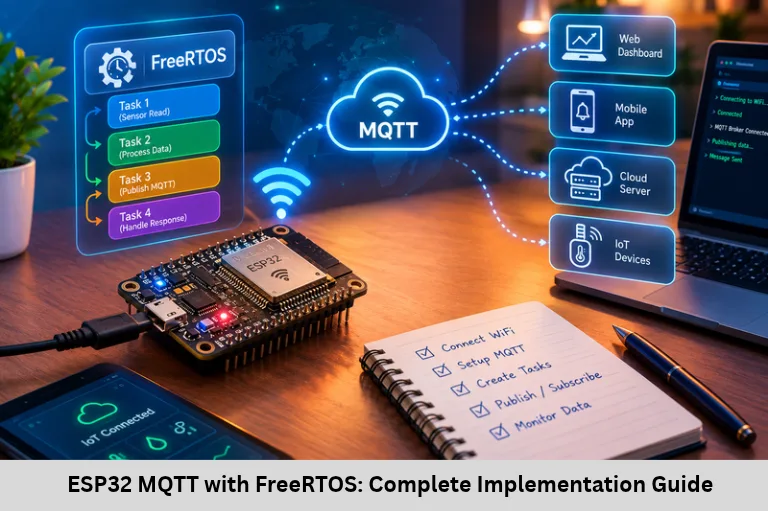
Learn ESP32 MQTT implementation with FreeRTOS using ESP-IDF, sensor tasks, queues, MQTT events, QoS, reconnection, debugging, and memory optimization.
- ESP32 MQTT with FreeRTOS: Complete Implementation Guide
-
ESP32 MQTT Implementation in an RTOS Environment
- Introduction to ESP32 MQTT and FreeRTOS
- Understanding MQTT and FreeRTOS
- Setting Up the ESP-IDF Development Environment
- Selecting the MQTT Client Library
- Designing the FreeRTOS Task Architecture
- Implementing MQTT Communication
- Reconnection, Debugging, and Optimization
- Frequently Asked Questions
- Conclusion
ESP32 MQTT Implementation in an RTOS Environment
Introduction to ESP32 MQTT and FreeRTOS
The Internet of Things (IoT) connects sensors, embedded controllers, industrial equipment, and cloud platforms to exchange data and automate operations. The ESP32 microcontroller is widely used in IoT development because supported variants integrate Wi-Fi and Bluetooth with GPIO, ADC, timers, and serial communication peripherals. When an application must collect sensor readings, process commands, and transmit data over a network, an appropriate software architecture is essential.
MQTT (Message Queuing Telemetry Transport) is a lightweight publish-subscribe messaging protocol designed for efficient communication between connected devices. FreeRTOS provides task scheduling, queues, semaphores, and synchronization mechanisms that help organize embedded firmware. Combining ESP32 MQTT with FreeRTOS enables modular sensor monitoring, remote device control, cloud connectivity, and industrial telemetry.
Embedded Tech Development Academy (ETDA) supports practical learning in Embedded C, ESP32 programming, Internet of Things (IoT) protocols, and real-time operating systems. Learners searching for a Top Embedded Training Institute in Bangalore can build practical skills through firmware development and hardware interfacing. Embedded Tech Development Academy (ETDA) also offers assured placement support to help learners prepare for embedded software and Internet of Things (IoT) engineering opportunities.
Understanding MQTT and FreeRTOS
MQTT Communication Architecture
MQTT uses a broker to route messages between clients. A publisher sends data to a topic, and subscribers receive messages from topics to which they have subscribed. This approach separates devices from one another and simplifies scalable Internet of Things (IoT) communication.
MQTT Quality of Service
- QoS 0: At most once; messages may be lost.
- QoS 1: At least once; duplicate delivery is possible.
- QoS 2: Exactly once at the MQTT protocol level, with additional communication overhead.
Keep-Alive and Retained Messages
The MQTT keep-alive interval helps detect an unresponsive connection. Retained messages allow a broker to store the latest retained publication for a topic and deliver it to new subscribers. These features must be configured according to application requirements.
FreeRTOS Components
FreeRTOS organizes firmware into independent tasks. Queues transfer data safely between tasks, mutexes protect shared resources, and semaphores coordinate events. The scheduler tick rate determines the timing granularity of tick-based delays; a 100 Hz tick, for example, corresponds to a nominal 10 ms tick period if configured that way.
Setting Up the ESP-IDF Development Environment
Install and Configure ESP-IDF
ESP-IDF is Espressif’s official development framework for supported ESP32 devices. Install a compatible ESP-IDF version and toolchain by following the official documentation: ESP-IDF Programming Guide.
Create a project from an example or a suitable project template. Configure the target chip and build settings, then use the configuration menu where applicable to define Wi-Fi credentials, MQTT broker settings, and task parameters.
Configure Dependencies
The official esp-mqtt component is integrated into ESP-IDF releases that include it. For versions using the component manager, declare the required dependency according to the version’s documentation. Avoid mixing component versions that are incompatible with the selected ESP-IDF release.
Secure Configuration
Do not commit Wi-Fi passwords, private keys, or production broker credentials to public repositories. Use appropriate TLS certificate validation and secure credential storage for deployed devices.
Selecting the MQTT Client Library
Using esp-mqtt
The esp-mqtt component provides MQTT client functionality for ESP-IDF. It supports connection management, publishing, subscribing, MQTT event handling, and TLS options, depending on the selected release and configuration.
A typical initialization sequence involves configuring the broker URI, initializing the client, registering an event handler, and starting the client. Check the API documentation for the installed ESP-IDF version because function signatures and configuration fields can change.
Designing the FreeRTOS Task Architecture
Separate Network, Sensor, and Command Responsibilities
A modular design separates sensor acquisition from network communication. This prevents a temporary network delay from unnecessarily blocking sensor sampling.
- Sensor task: Reads sensors at a defined interval and places measurements into a FreeRTOS queue.
- MQTT task or event-driven client: Manages message publication and network status without blocking unrelated application tasks.
- Command handler: Processes received messages, validates commands, and requests controlled actions such as changing a setting or toggling a GPIO.
Queue-Based Data Transfer
Use a queue to transfer structured sensor readings from the sensor task to the MQTT publishing logic. Configure its capacity based on the sampling rate and the maximum expected network outage. If the queue becomes full, choose a deliberate policy: block briefly, discard old data, discard new data, or record an overflow counter.
Task Priorities and Stack Sizes
Assign priorities based on deadlines and responsiveness requirements, not simply on task names. Measure stack usage during testing and review uxTaskGetStackHighWaterMark() results to identify limited stack headroom.
Implementing MQTT Communication
Initialize the Client and Handle Events
The following simplified example illustrates the basic event-driven pattern. It assumes the Wi-Fi connection and broker configuration are handled elsewhere.
#include "mqtt_client.h"
#include "esp_log.h"

static const char *TAG = "MQTT";
static esp_mqtt_client_handle_t client;

static void mqtt_event_handler(void *arg,
                               esp_event_base_t base,
                               int32_t event_id,
                               void *event_data)
{
    esp_mqtt_event_handle_t event =
        (esp_mqtt_event_handle_t) event_data;

    switch (event_id) {
    case MQTT_EVENT_CONNECTED:
        ESP_LOGI(TAG, "MQTT connected");
        esp_mqtt_client_subscribe(client, "device/command", 1);
        break;

    case MQTT_EVENT_DISCONNECTED:
        ESP_LOGW(TAG, "MQTT disconnected");
        break;

    case MQTT_EVENT_DATA:
        ESP_LOGI(TAG, "Received MQTT data");
        /* Validate and process the payload safely. */
        break;

    default:
        break;
    }
}
Configure the client with the broker URI, register the handler using the API for the selected ESP-IDF version, and start the client. The example demonstrates event handling rather than a complete standalone application.
Publishing Sensor Data
After a valid measurement is obtained, serialize it into a suitable payload, such as JSON, and publish it to a topic such as device/temperature. Check return values and define what happens when publication cannot proceed. Avoid lengthy sensor operations or blocking delays inside MQTT event callbacks.
Reconnection, Debugging, and Optimization
Handling Network Failures
Wi-Fi outages, unavailable brokers, and TCP errors can interrupt MQTT communication. Handle disconnection events, verify the Wi-Fi state, and use the client’s supported reconnection mechanism. Exponential backoff can reduce repeated connection attempts during prolonged outages.
Testing and Diagnostics
Use idf.py monitor to inspect serial logs, an MQTT client such as MQTT Explorer to publish and subscribe, and Wireshark to analyze network traffic where appropriate. Test QoS behavior, retained messages, duplicate delivery, broker outages, and queue overflow.
Memory and CPU Optimization
Monitor available heap using ESP-IDF heap-capability APIs such as heap_caps_get_free_size(). Prefer bounded buffers for predictable memory use, minimize unnecessary logging in production, and avoid blocking operations in callbacks. Use watchdogs appropriately, and never restart a task merely because a network connection is temporarily unavailable.
Frequently Asked Questions
What is MQTT in ESP32?
MQTT is a lightweight publish-subscribe protocol that allows an ESP32 device to exchange messages with a broker and other subscribed clients.
Why use FreeRTOS with MQTT on ESP32?
FreeRTOS helps separate sensor sampling, communication, and command processing into tasks, while queues and synchronization mechanisms support safe data exchange.
Which MQTT library is used with ESP-IDF?
The esp-mqtt component is the standard MQTT client option in ESP-IDF versions that include or support it. Confirm compatibility with the installed framework release.
How can an ESP32 reconnect after an MQTT disconnection?
Handle MQTT disconnection events and use the client’s supported reconnection behavior. Also check Wi-Fi connectivity, configure suitable retry delays, and log repeated failures for diagnosis.
How can MQTT performance be improved on ESP32?
Use suitable publication intervals and QoS levels, keep callbacks short, size queues and task stacks carefully, monitor heap usage, and use TLS and credential protection for production deployments.
Conclusion
Implementing MQTT on ESP32 with FreeRTOS provides a structured approach to wireless telemetry, remote monitoring, sensor data publication, and command processing. Reliable firmware requires correct ESP-IDF configuration, a compatible MQTT client, queue-based task communication, event-driven connection handling, suitable QoS selection, secure broker connections, and careful memory and timing analysis. These practices help developers create scalable Internet of Things (IoT) solutions for smart agriculture, industrial monitoring, connected appliances, and automation.
Embedded Tech Development Academy (ETDA) helps learners develop practical skills in ESP32 firmware, Embedded C, MQTT communication, FreeRTOS scheduling, and Internet of Things (IoT) debugging. Learners looking for a Top Embedded Training Institute in Bangalore can focus on hands-on projects that connect sensors, microcontrollers, and network services. With assured placement support, Embedded Tech Development Academy (ETDA) helps learners prepare for embedded software, firmware, and Internet of Things (IoT) development roles.
Author: ETDA Trainers
Experience: 10+ Years of Industry Experience in Embedded Systems, IoT, and Embedded C Programming