
Linux Device Drivers: USB Subsystem and Driver Guide
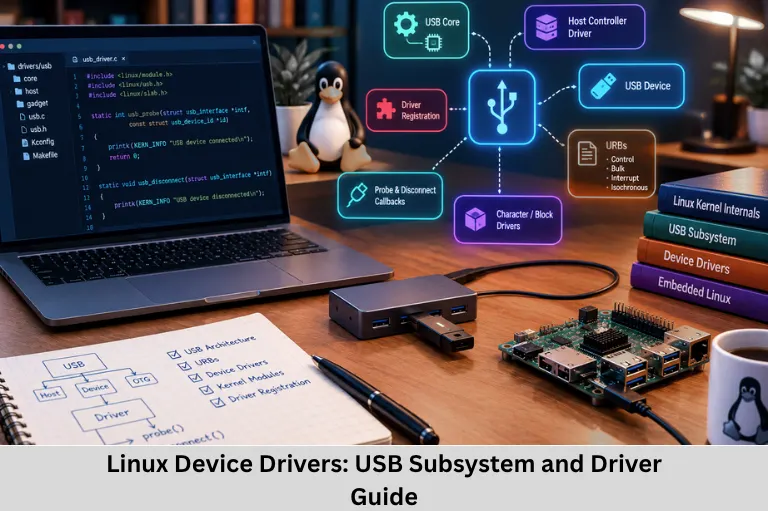
Learn Linux device drivers, character and block drivers, USB architecture, probe and disconnect callbacks, URBs, kernel modules, and driver registration. Embedded Tech Development Academy (ETDA).
- Linux Device Drivers: USB Subsystem and Driver Guide
-
Linux Device Drivers: Architecture, Types, and USB Subsystem
- Introduction to Embedded Linux Device Drivers
- What Is a Linux Device Driver?
- Classification of Linux Device Drivers
- Driver Classification Based on Kernel Subsystems
- Overview of the Linux USB Subsystem
- The probe() Callback and Device Initialization
- USB Request Blocks (URBs)
- The disconnect() Callback and Device Removal
- The usb_driver Structure and Registration
- Learning Linux Device Driver Development
- Frequently Asked Questions
- Conclusion
Linux Device Drivers: Architecture, Types, and USB Subsystem
Introduction to Embedded Linux Device Drivers
Linux device drivers are essential software components that enable the Linux kernel to communicate with hardware peripherals. In an embedded Linux system, a device driver provides the interface between hardware and the operating system, allowing applications to access devices without needing to understand their low-level implementation. Devices such as sensors, USB adapters, storage drives, network interfaces, displays, and serial ports depend on appropriate kernel drivers or subsystem support.
Device drivers manage hardware initialization, data transfers, interrupts, memory resources, and communication protocols. They also integrate hardware with Linux kernel subsystems such as the USB subsystem, TTY subsystem, networking stack, and block I/O layer. Depending on the device, applications may access functionality through device files in /dev, network interfaces, or higher-level kernel interfaces.
Understanding Linux device driver development requires knowledge of C programming, kernel modules, kernel APIs, device enumeration, USB Vendor ID (VID) and Product ID (PID), probe and disconnect callbacks, USB Request Blocks (URBs), and asynchronous I/O. These concepts are particularly important in embedded Linux development, industrial automation, Internet of Things (IoT) gateways, and communication systems.
For aspiring embedded engineers, Embedded Tech Development Academy (ETDA) emphasizes practical technical skills that connect firmware development with hardware-software integration. Learners comparing the Top Embedded Training Institute in Bangalore can look for hands-on exposure to Linux commands, kernel modules, device communication, and driver debugging, alongside assured placement support.
What Is a Linux Device Driver?
A Linux device driver is kernel-level software that controls or provides access to a hardware device. It translates requests from the operating system or a relevant subsystem into device-specific operations.
For example, a USB-to-serial adapter requires driver support to expose a serial communication interface to applications. Once correctly initialized, the device may appear as /dev/ttyUSB0, allowing a user-space program to communicate through standard file operations or serial libraries.
Key Responsibilities of Device Drivers
Initialize and configure hardware.
Manage data transmission and reception.
Handle interrupts and asynchronous events.
Allocate and release device resources.
Report errors and device status.
Connect hardware to the appropriate kernel subsystem.
Clean up resources when a device is removed.
Linux Driver Architecture
Linux supports modular driver development. A compatible driver may be built into the kernel or compiled as a loadable kernel module. Modules can often be loaded and unloaded without rebuilding the entire kernel, although dependencies and active device usage must be handled correctly.
Classification of Linux Device Drivers
Linux drivers are commonly described as character, block, and network drivers. These categories represent different programming interfaces and kernel subsystems rather than a complete classification of every driver.
Character Device Drivers
Character drivers provide access to devices that commonly transfer data as a stream of bytes. They often expose a device node under /dev and support operations such as open(), read(), write(), and ioctl().
Examples: Serial ports, terminal devices, and many simple sensor interfaces.
Block Device Drivers
Block drivers support storage devices that access data in addressable blocks. They integrate with the Linux block layer and storage stack, enabling filesystems to read and write data efficiently.
Examples: Hard disks, USB flash drives, SD cards, and eMMC storage.
Network Device Drivers
Network drivers connect hardware to the Linux networking stack. They manage packet transmission and reception and expose network interfaces for configuration and communication.
Examples: Ethernet adapters, Wi-Fi devices, and USB-to-Ethernet adapters.
Driver Classification Based on Kernel Subsystems
Why Subsystems Matter
Linux provides common frameworks for different classes of hardware. A driver normally integrates with the subsystem that matches the device’s function, rather than implementing every operation independently.
Example: Different USB Devices
A USB connection can expose different functions depending on the attached device:
USB-to-Ethernet adapter: Integrates with the network stack and provides a network interface.
USB-to-serial adapter: Integrates with the USB serial framework and may expose
/dev/ttyUSB0.USB mass-storage device: Uses the USB storage and SCSI layers, then the block layer, to expose a storage device.
Important Technical Distinction
The names and device nodes depend on the driver, system configuration, and enumeration order. A USB device does not automatically become a character, block, or network device merely because it uses USB; its function and subsystem determine the interface.
Overview of the Linux USB Subsystem
The Linux USB subsystem provides shared infrastructure for USB host controllers, connected devices, interfaces, endpoints, and specialized drivers. It separates common bus operations from device-specific functionality.
USB Core
The USB core coordinates device enumeration, descriptor handling, driver matching, and communication with USB drivers. It also provides APIs and data structures that drivers use to manage USB devices and submit transfers.
USB Descriptors and Driver Matching
When a USB device is connected, the host detects it and obtains its descriptors. These descriptors contain information such as the vendor ID, product ID, device configuration, interfaces, and endpoints.
A USB driver’s ID table specifies the devices or interface types it supports. The USB core uses matching rules to determine whether the driver is suitable for a connected device or interface.
The probe() Callback and Device Initialization
What Is probe()?
The probe() callback is invoked when the USB core matches a device or interface with a registered driver. It is responsible for setting up the driver’s software state and preparing the device for use.
Typical Device Initialization Sequence
Device detection: The host controller detects a connected USB device.
Descriptor retrieval: The USB core reads device and configuration descriptors.
Driver matching: The kernel compares device information with registered drivers.
Driver binding: The USB core invokes the matching driver’s
probe()callback.Resource initialization: The driver allocates private data, identifies endpoints, and prepares transfer buffers.
Subsystem integration: The driver registers or connects the device to the appropriate framework when required.
Registering with a Kernel Subsystem
The integration method depends on the device type. Network drivers use networking APIs, USB serial drivers commonly use the USB serial framework, and mass-storage devices use the USB storage and SCSI infrastructure.
Resource Management in probe()
A driver must check allocation and initialization failures and release any resources already acquired if setup cannot be completed. Correct error handling prevents memory leaks and inconsistent device states.
USB Request Blocks (URBs)
What Is a URB?
A USB Request Block (URB) is a kernel data structure used to describe a USB transfer. Drivers submit URBs to the USB core to request data transmission or reception through an endpoint.
URBs support different transfer types, including control, bulk, interrupt, and isochronous transfers. The appropriate type depends on the device’s communication requirements.
Asynchronous USB Transfers
Many USB operations are asynchronous. After a driver submits an URB, the transfer proceeds through the USB subsystem, and a completion callback is invoked when the request finishes or encounters an error.
URB Completion Handling
The completion handler examines the transfer status and actual data length, processes received data when appropriate, and may schedule further work.
Safe Transfer Management
Drivers must handle failed submissions, cancellation, device removal, and synchronization carefully. URB buffers and associated data must remain valid for the entire period in which the transfer can access them.
The disconnect() Callback and Device Removal
Purpose of disconnect()
When a USB device or interface is removed, the USB core calls the driver’s disconnect() callback. The driver must stop active operations, prevent new transfers, detach the device from its subsystem, and release resources associated with the connection.
Cleanup Responsibilities
Typical cleanup operations include killing or cancelling outstanding URBs, unregistering interfaces, releasing references, and freeing private memory. Drivers must also ensure that user-space operations cannot access invalid device state after removal.
The usb_driver Structure and Registration
Defining a USB Driver
A USB driver typically defines a struct usb_driver containing its name, callbacks, and device ID table.
static struct usb_driver example_driver = {
    .name       = "example_driver",
    .probe      = example_probe,
    .disconnect = example_disconnect,
    .id_table   = example_id_table,
};
The ID table identifies supported devices or interfaces. The actual implementation must define the callbacks and table using the correct kernel APIs.
Registering and Unregistering the Driver
A USB driver is normally registered with the USB core using usb_register() or a suitable registration helper, and removed using usb_deregister(). In module-based drivers, these operations are typically connected to module initialization and exit functions.
Registration Lifecycle
Registration makes the driver available for matching against compatible devices. When a matching device is found, the USB core can invoke probe(). During removal, deregistration prevents further matching and initiates driver detachment as appropriate.
Kernel Version Compatibility
Linux kernel APIs can change between versions. Developers should use the headers and documentation for their target kernel, compile against the appropriate kernel build tree, and check module-loading logs when troubleshooting registration failures.
Learning Linux Device Driver Development
Practical Linux driver development requires C programming, pointers, structures, memory management, kernel module building, Makefiles, system calls, and debugging skills. Engineers should also learn commands such as lsusb, dmesg, lsmod, and modinfo, which help inspect connected USB devices, kernel messages, loaded modules, and module metadata.
Embedded Tech Development Academy (ETDA) supports technical learning focused on embedded development and hardware-software integration. Learners exploring the Top Embedded Training Institute in Bangalore should prioritize kernel-level programming exercises, real hardware testing, and systematic debugging. Practical training combined with assured placement support can help aspiring engineers prepare for embedded Linux and driver-development roles.
Frequently Asked Questions
What is a Linux device driver?
A Linux device driver is kernel software that manages a hardware device and provides the appropriate interface for the operating system or a kernel subsystem to use it.
What are the three common types of Linux device drivers?
The common categories are character drivers, block drivers, and network drivers. Each integrates with a different style of device access or kernel subsystem.
What is the purpose of the USB probe() callback?
The probe() callback initializes a device after the USB core matches it with a registered driver. It prepares resources and connects the device to the appropriate subsystem.
What is a USB Request Block (URB)?
A URB describes a USB transfer submitted by a kernel driver. It supports communication through USB endpoints and can use completion callbacks to handle transfer results.
What happens when a USB device is disconnected?
The USB core invokes the driver’s disconnect() callback. The driver must stop ongoing transfers, detach the device from its subsystem, and release connection-related resources safely.
Conclusion
Linux device drivers form a critical layer between embedded hardware and the operating system. By integrating with character, block, networking, USB, TTY, and storage subsystems, drivers enable applications to communicate with peripherals through standardized interfaces. Understanding kernel modules, USB descriptors, VID/PID matching, probe() and disconnect() callbacks, URBs, and driver registration is essential for developing reliable embedded Linux solutions.
Safe driver development also requires careful resource allocation, asynchronous transfer handling, synchronization, error recovery, and cleanup during device removal. These concepts are especially relevant to USB communication, industrial control, network gateways, and Internet of Things (IoT) products.
Embedded Tech Development Academy (ETDA) encourages learners to build practical technical knowledge that connects C programming, embedded systems, Linux internals, and hardware integration. Students evaluating the Top Embedded Training Institute in Bangalore should seek hands-on practice with kernel modules, device enumeration, driver debugging, and real hardware. Training that combines these skills with assured placement support can help learners prepare for embedded Linux engineering opportunities.
As embedded products become more connected and software-driven, Linux device driver expertise remains valuable for engineers working with peripheral interfaces, communication devices, storage systems, and custom hardware. Embedded Tech Development Academy (ETDA) provides a learning pathway for developing relevant technical foundations, while learners searching for a Top Embedded Training Institute in Bangalore should assess practical lab experience and kernel-development coverage. With focused learning and assured placement support, aspiring engineers can work toward roles involving Linux kernel modules, USB drivers, and embedded platform integration.
Author: ETDA Trainers
Experience: 10+ Years of Industry Experience in Embedded Systems, IoT, and Embedded C Programming