
STM32CubeIDE Tutorial: Complete Guide for Beginners | Learn STM32 Development | ETDA
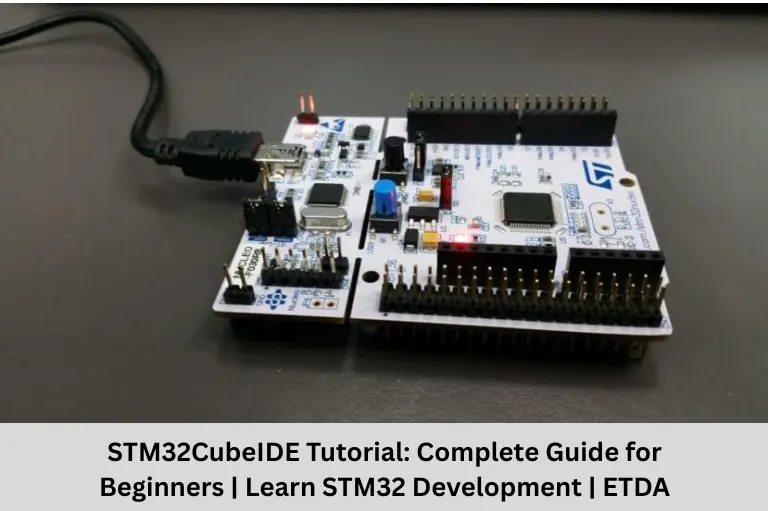
Learn STM32CubeIDE with this complete beginner’s guide. Explore installation, features, project creation, debugging, and STM32 programming. Join ETDA, the Top Embedded Training Institute in Bangalore.
- STM32CubeIDE Tutorial: Complete Guide for Beginners | Learn STM32 Development | ETDA
-
STM32CubeIDE Tutorial: Complete Guide for Beginners
- What is STM32CubeIDE?
- Why is STM32CubeIDE Popular?
- Features of STM32CubeIDE
- How to Install STM32CubeIDE
- STM32CubeIDE Development Workflow
- Programming STM32 Using STM32CubeIDE
- Debugging with STM32CubeIDE
- Real-Time Projects Using STM32CubeIDE
- Why Learn STM32CubeIDE at Embedded Tech Development Academy (ETDA)?
- Career Opportunities After Learning STM32CubeIDE
- Frequently Asked Questions (FAQs)
- Conclusion
STM32CubeIDE Tutorial: Complete Guide for Beginners
The demand for Embedded Systems Engineers has grown significantly due to advancements in Internet of Things(IoT), Automotive Electronics, Industrial Automation, Robotics, Medical Devices, and Smart Consumer Products. At the center of many of these innovations is the STM32 microcontroller, one of the most widely used ARM Cortex-M-based microcontroller families in the world.
To develop applications for STM32 microcontrollers, engineers use STM32CubeIDE, an integrated development environment (IDE) provided by STMicroelectronics. It combines project creation, code editing, compiling, debugging, and device configuration into a single platform, making embedded software development faster and more efficient.
For beginners, STM32CubeIDE offers an excellent starting point because it simplifies hardware configuration through a graphical interface while still allowing developers to write professional-grade Embedded C code.
If you want to become an Embedded Systems Engineer, learning STM32CubeIDE is an essential skill. Choosing the Top Embedded Training Institute in Bangalore can accelerate your learning through structured training and practical experience.
Embedded Tech Development Academy (ETDA) is recognized as one of the Top Embedded Training Institutes in Bangalore, offering industry-oriented training in C Programming, Embedded C, ARM Cortex-M, STM32, LPC1768, RTOS, Internet of Things(IoT), CAN Protocol, Automotive Embedded Systems, and real-time project development with assured placement support.
In this complete beginner’s guide, you’ll learn what STM32CubeIDE is, its features, installation process, project workflow, debugging techniques, and why mastering this tool is essential for a successful career in Embedded Systems.
What is STM32CubeIDE?
STM32CubeIDE is a free Integrated Development Environment (IDE) developed by STMicroelectronics for programming STM32 microcontrollers.
It combines multiple development tools into one software package, allowing developers to:
- Create Embedded Projects
- Configure Hardware
- Write Embedded C Code
- Compile Programs
- Debug Applications
- Flash Firmware to STM32 Boards
Instead of using multiple software tools, developers can perform the complete development cycle inside STM32CubeIDE.
Why is STM32CubeIDE Popular?
STM32CubeIDE has become the preferred development environment for STM32-based applications because it simplifies firmware development.
Free Development Environment
Students and professionals can download and use STM32CubeIDE at no cost.
Built-in STM32CubeMX
One of its biggest advantages is the integrated STM32CubeMX configuration tool.
CubeMX Allows You To
- Configure GPIO Pins
- Enable Peripherals
- Configure Clock Settings
- Generate Initialization Code
- Reduce Manual Coding
This significantly speeds up development.
Professional Debugging Tools
Developers can easily identify software issues using:
- Breakpoints
- Variable Monitoring
- Memory Viewer
- Register Viewer
- Step-by-Step Execution
These debugging features improve firmware quality.
Cross-Platform Support
STM32CubeIDE works on:
- Windows
- Linux
- macOS
This flexibility makes it accessible to developers using different operating systems.
Features of STM32CubeIDE
STM32CubeIDE provides everything required for embedded software development.
Code Editor
The IDE includes a modern editor with:
- Syntax Highlighting
- Auto Completion
- Error Detection
- Code Navigation
These features improve coding productivity.
Project Management
Developers can efficiently organize source files, libraries, drivers, middleware components, project resources, and code structures for streamlined development.
Peripheral Configuration
Using STM32CubeMX, developers can configure:
- GPIO
- UART
- SPI
- I2C
- ADC
- DAC
- Timers
- PWM
- USB
- CAN
without writing initialization code manually.
Compiler Integration
STM32CubeIDE includes a powerful GCC compiler optimized for ARM Cortex-M processors, enabling efficient code compilation and reliable application development.
Built-in Debugger
Developers can debug firmware using ST-Link and supported debugging hardware, ensuring efficient testing, troubleshooting, and performance analysis.
How to Install STM32CubeIDE
Installing STM32CubeIDE is straightforward.
Step 1 – Download the IDE
Visit the official STMicroelectronics website and download the latest version compatible with your operating system.
Step 2 – Run the Installer
Follow the installation wizard and accept the default settings unless specific customization is required.
Step 3 – Launch STM32CubeIDE
After installation, open the IDE and choose a workspace where your projects will be stored.
Step 4 – Create Your First Project
- File → New STM32 Project
- Choose the STM32 Microcontroller or Development Board
- Configure Peripherals
- Generate Project
You are now ready to start programming.
STM32CubeIDE Development Workflow
Understanding the development workflow helps beginners work efficiently.
Create a Project
Choose your STM32 device and initialize the project.
Configure Hardware
Use CubeMX to configure:
- GPIO
- UART
- Timers
- ADC
- Communication Interfaces
Generate Code
CubeMX automatically generates initialization code, simplifying peripheral configuration and reducing development time for embedded applications.
Write Embedded C Program
Add your application logic inside the designated user code sections to ensure code remains intact during regeneration.
Build the Project
Compile the firmware and resolve any compilation errors to ensure successful code execution and reliable system performance.
Flash the Microcontroller
Transfer the compiled firmware to the STM32 board using ST-Link for programming, testing, and validating application functionality.
Debug the Application
Use breakpoints and debugging tools to analyze program execution, identify issues, and verify firmware behavior effectively.
Programming STM32 Using STM32CubeIDE
STM32CubeIDE supports programming for a wide variety of applications.
GPIO Programming
- LED Blinking
- Push Button Interface
- Relay Control
Timer Programming
UART Communication
Enable serial communication between embedded devices for reliable data exchange, device interfacing, and real-time system communication.
ADC Programming
Read analog sensor values to monitor physical parameters and convert real-world signals into digital data for processing.
PWM Generation
Sensor Interfacing
Connect temperature, motion, humidity, and pressure sensors to collect environmental data and enable intelligent embedded system applications.
Debugging with STM32CubeIDE
Debugging is one of the most valuable features of STM32CubeIDE.
Breakpoints
Pause program execution at selected lines to inspect variables, analyze behavior, and efficiently troubleshoot firmware issues.
Variable Monitoring
Observe variable values in real time to monitor program behavior, verify logic, and simplify debugging during development.
Register Viewer
Monitor ARM processor registers to analyze CPU operations, track execution flow, and diagnose low-level system issues.
Memory Viewer
Analyze memory usage and data storage to optimize resource allocation, improve performance, and ensure efficient embedded system operation.
Step Execution
Execute firmware one instruction at a time to identify logical errors.
These tools help developers troubleshoot applications quickly.
Real-Time Projects Using STM32CubeIDE
Practical projects strengthen embedded programming skills.
Beginner Projects
- LED Blinking
- Traffic Light Controller
- LCD Display
- Digital Stopwatch
Intermediate Projects
- Home Automation
- Smart Energy Meter
- Temperature Monitoring
- Motor Speed Controller
Advanced Projects
- IoT Smart Home
- Smart Agriculture
- Vehicle Tracking System
- Industrial Automation
- CAN Communication System
- Smart Healthcare Monitoring
Building projects improves confidence and interview performance.
Why Learn STM32CubeIDE at Embedded Tech Development Academy (ETDA)?
Industry-Oriented Curriculum
Students receive comprehensive training in:
- C Programming
- Embedded C
- ARM Cortex-M
- STM32 Programming
- LPC1768
- RTOS
- IoT
- UART
- SPI
- I2C
- CAN Protocol
- ECU Concepts
- Automotive Embedded Systems
Hands-On Hardware Training
Every concept is implemented using actual STM32 development boards and embedded hardware.
Students learn how to:
- Configure peripherals
- Interface sensors
- Debug firmware
- Optimize embedded applications
Real-Time Industry Projects
Students develop multiple embedded applications using STM32CubeIDE, strengthening their technical skills and project portfolios.
Assured Placement Support
ETDA prepares students for successful careers through:
- Resume Building
- Technical Interview Preparation
- Aptitude Training
- Mock Interviews
- Communication Skills Development
- Company-Specific Guidance
- Assured Placement Support
This career-oriented approach helps students transition confidently into the embedded industry.
Career Opportunities After Learning STM32CubeIDE
Learning STM32CubeIDE opens doors to numerous technical roles.
Career Options
- Embedded Software Engineer
- Firmware Engineer
- IoT Developer
- Automotive Embedded Engineer
- Embedded Test Engineer
- Robotics Engineer
- Industrial Automation Engineer
- Product Development Engineer
STM32 expertise is highly valued across semiconductor companies, automotive manufacturers, IoT startups, and industrial automation firms.
Frequently Asked Questions (FAQs)
What is STM32CubeIDE used for?
STM32CubeIDE is an Integrated Development Environment used for programming, debugging, and developing firmware for STM32 microcontrollers.
Is STM32CubeIDE free?
Yes. STM32CubeIDE is available free of charge from STMicroelectronics.
Do beginners need STM32CubeIDE?
Yes. It simplifies hardware configuration and provides an excellent environment for learning embedded development.
Which programming language is used in STM32CubeIDE?
STM32CubeIDE primarily uses C Programming and Embedded C for firmware development.
Why should I learn STM32 programming?
STM32 microcontrollers are widely used in IoT, automotive, medical, industrial automation, robotics, and consumer electronics, making STM32 skills highly valuable.
Why choose ETDA for STM32 training?
ETDA offers practical STM32 training with real hardware, real-time projects, experienced faculty, industry-oriented curriculum, and assured placement support, making it one of the Top Embedded Training Institutes in Bangalore.
Conclusion
STM32CubeIDE has become one of the most powerful and beginner-friendly development environments for Embedded Systems programming. By combining project management, hardware configuration, code development, compiling, debugging, and firmware flashing into a single platform, it simplifies the complete embedded development process. Whether you’re building a simple LED blinking application or a complex IoT-enabled automation system, STM32CubeIDE provides the tools needed to develop reliable and efficient embedded software.
For engineering students and aspiring embedded professionals, mastering STM32CubeIDE is a valuable step toward building a successful career in Embedded Systems. Learning through hands-on practice, hardware interaction, and real-time projects is essential to becoming industry-ready.
If you’re looking for the Top Embedded Training Institute in Bangalore, Embedded Tech Development Academy (ETDA) offers a structured learning path that covers C Programming, Embedded C, ARM Cortex-M, STM32CubeIDE, LPC1768, RTOS, Internet of Things(IoT), CAN Protocol, ECU concepts, and Automotive Embedded Systems. With expert trainers, practical lab sessions, real-world projects, and assured placement support, ETDA equips students with the technical expertise and confidence needed to excel in the embedded industry.
By joining Embedded Tech Development Academy (ETDA), you’ll gain more than technical knowledge—you’ll develop the practical skills, project experience, and career readiness that leading technology companies look for in Embedded Systems Engineers.
Author: ETDA Trainers
Experience: 10+ Years of Industry Experience in Embedded Systems, IoT, and Embedded C Programming