
Environment Variables in Linux: Complete Guide with Commands
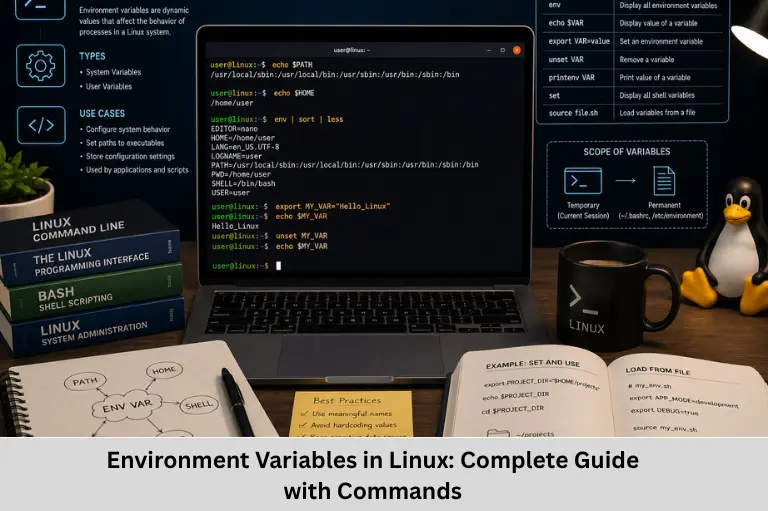
Learn Linux environment variables, PATH, HOME, SHELL, export, printenv, env, unset, shell configuration, and practical environment variable management.
- Environment Variables in Linux: Complete Guide with Commands
-
Understanding Environment Variables in Linux
- What Are Environment Variables in Linux?
- Types of Variables in Linux Shells
- Common Linux Environment Variables
- Viewing Environment Variables
- Setting Environment Variables
- Making Environment Variables Persistent
- Unsetting Environment Variables
- Practical Example with Shell Scripts
-
Real-World Uses of Environment Variables
- Development and Build Systems
- Application Configuration
- Development and Production Environments
- Shell Customization
- FAQs
- What is an environment variable in Linux?
- What is the difference between a shell variable and an environment variable?
- How do I permanently set an environment variable in Linux?
- What does the PATH environment variable do?
- How do I remove an environment variable?
- Conclusion
Understanding Environment Variables in Linux
Linux is a powerful operating system widely used in servers, cloud infrastructure, embedded systems, software development, networking, DevOps, and everyday computing. One of the features that makes Linux highly configurable is its environment variable system. Environment variables provide processes with information about their execution environment and allow users and applications to change configuration without modifying source code.
For example, variables such as PATH, HOME, USER, SHELL, PWD, and LANG influence how commands and applications operate. Developers can also create custom variables for project directories, compiler configurations, application modes, ports, and other runtime settings.
Understanding Linux environment variables, shell variables, Bash environment configuration, PATH configuration, Linux shell scripting, process environments, export variables, and environment management is therefore an important skill for Linux administrators and software developers. Environment variables are also particularly relevant to embedded engineers who frequently work with cross-compilation toolchains, SDKs, build systems, GCC, Make, CMake, and embedded development environments.
Embedded Tech Development Academy (ETDA) focuses on practical technical learning across embedded systems, Linux, C/C++, and software development. As a Top Embedded Training Institute in Bangalore, Embedded Tech Development Academy (ETDA) helps learners understand operating-system concepts and development tools through practical exposure, along with assured placement support.
Whether you are learning Linux for embedded development, system programming, shell scripting, or DevOps, environment variables form an essential part of the Linux command-line environment. Building this knowledge at Embedded Tech Development Academy (ETDA), a Top Embedded Training Institute in Bangalore, can help learners develop practical Linux skills while benefiting from assured placement support.
What Are Environment Variables in Linux?
An environment variable is a name-value pair associated with a process environment.
The general format is:
VARIABLE_NAME=valueFor example:
HOME=/home/john
PATH=/usr/bin:/usr/local/bin
The variable name identifies the setting, while the value contains the associated information.
How Environment Variables Work
When a shell starts a program, the program can receive a copy of the shell’s environment. This allows applications to access configuration information without hard-coding every value.
For example:
echo $HOMEThe shell expands $HOME to its current value before executing the command.
Process Environment
Environment variables belong to a process environment. A child process normally inherits environment variables from its parent process when it is created.
This inheritance model is particularly important in shell scripting and application configuration.
Types of Variables in Linux Shells
Linux shells distinguish between ordinary shell variables and exported environment variables.
Local Shell Variables
A shell variable created without export is available within the current shell.
MY_VAR="Hello Linux"
echo "$MY_VAR"
A child process normally does not receive MY_VAR as an environment variable.
Exported Environment Variables
Use export to place a shell variable into the environment inherited by subsequently launched child processes.
export MY_VAR="Hello Linux"You can verify it using:
printenv MY_VARShell Variables
Some variables are maintained or interpreted by the shell itself. Examples include:
PS1— primary command promptHISTSIZE— command history sizeIFS— internal field separatorPWD— current working directory
Not every shell variable is necessarily an environment variable.
Common Linux Environment Variables
| Variable | Purpose | Example |
|---|---|---|
PATH |
Directories searched for executable commands | /usr/bin:/usr/local/bin |
HOME |
User's home directory | /home/john |
USER |
Current username | john |
SHELL |
User's configured shell | /bin/bash |
PWD |
Present working directory | /home/john/project |
LANG |
Locale and language configuration | en_US.UTF-8 |
EDITOR |
Preferred text editor | nano |
Understanding PATH
PATH is one of the most important environment variables.
When you type:
gccthe shell searches directories listed in PATH to locate the executable.
View it with:
echo "$PATH"Directories are separated by colons:
/usr/local/bin:/usr/bin:/binAdding a Directory to PATH
For the current shell:
export PATH="$PATH:$HOME/bin"This adds $HOME/bin to the existing search path.
Viewing Environment Variables
Linux provides several commands for examining variables.
Using printenv
To display the environment:
printenvTo display one variable:
printenv HOMEUsing env
The env command can display the environment passed to a command or list the current environment.
envFor example:
env | grep PATHUsing echo
The echo command can display a variable:
echo "$USER"
echo "$HOME"
echo "$SHELL"
Quoting variables is generally a good shell-scripting practice, especially when values may contain spaces.
Setting Environment Variables
Temporarily Setting a Variable
For the current shell session:
MY_NAME="Linux User"
export MY_NAME
Or:
export MY_NAME="Linux User"The variable remains available to the current shell and child processes launched from it.
Passing Variables to a Single Command
A variable can also be assigned only for a particular command:
DEBUG=true ./applicationThe variable is available to that command’s process environment without permanently modifying the shell environment.
Making Environment Variables Persistent
Environment variables created using export normally disappear when the shell session ends.
Bash Startup Files
For Bash users, commonly used startup files include:
~/.bashrc~/.bash_profile~/.profile
The exact file used depends on whether the shell is interactive, login-based, and how the system is configured.
Example Using .bashrc
Add:
export PROJECT_DIR="$HOME/myproject"Then reload the file:
source ~/.bashrcNow:
echo "$PROJECT_DIR"can display the configured project path.
System-Wide Configuration
System-wide environment configuration can be managed through files such as /etc/environment, depending on the Linux distribution and login mechanism.
Care should be taken when modifying system-wide configuration because incorrect values can affect multiple users and applications.
Unsetting Environment Variables
The unset command removes a variable from the current shell environment.
unset MY_NAMEVerify:
printenv MY_NAMEIf the variable no longer exists, printenv will not display its previous value.
Practical Example with Shell Scripts
Suppose an embedded software project is stored in a specific directory.
Set:
export PROJECT_DIR="$HOME/myproject"Then a script can use:
cd "$PROJECT_DIR" || exit 1
echo "Working in: $PROJECT_DIR"
This avoids hard-coding the complete directory path in multiple scripts.
Why This Is Useful for Development
Environment variables can configure:
- Compiler locations
- SDK paths
- Build directories
- Toolchain paths
- Debug modes
- Application ports
- Library locations
- Deployment environments
For example, embedded development workflows may use environment variables to locate cross-compilers, SDK directories, or board-specific toolchains.
Real-World Uses of Environment Variables
Development and Build Systems
Build systems such as Make and CMake can use environment variables to locate tools and dependencies.
Application Configuration
Applications can use variables such as:
export DEBUG=true
export PORT=8080
This allows configuration to be changed without modifying application source code.
Development and Production Environments
Different configurations can be supplied for development, testing, and production environments.
Shell Customization
Variables such as PS1, EDITOR, and locale-related variables can customize the command-line environment.
Security Consideration
Environment variables should not automatically be treated as a secure secret store. Sensitive values such as passwords and API keys can potentially be exposed through process inspection, debugging, logs, or accidental command output. Production systems should use appropriate secret-management mechanisms when stronger protection is required.
FAQs
What is an environment variable in Linux?
An environment variable is a name-value pair associated with a process environment. It provides configuration or contextual information to programs running in that environment.
What is the difference between a shell variable and an environment variable?
A shell variable exists in the current shell unless exported. An environment variable is exported so that child processes can inherit it.
How do I permanently set an environment variable in Linux?
For Bash, a user can place an export statement in an appropriate startup file such as ~/.bashrc or ~/.profile, depending on the required shell/session behavior.
What does the PATH environment variable do?
PATH contains a list of directories that the shell searches when locating executable commands. Directories are separated by colons.
How do I remove an environment variable?
Use the unset command:
unset VARIABLE_NAMEThis removes the variable from the current shell environment.
Conclusion
Linux environment variables provide a flexible mechanism for passing configuration and execution-context information to processes. By understanding shell variables, exported variables, process environments, PATH configuration, Bash startup files, environment inheritance, shell scripting, and runtime configuration, developers can build more maintainable and portable Linux applications.
Commands such as printenv, env, echo, export, and unset provide the basic tools needed to inspect and manage variables. Developers should also understand the difference between a shell variable and an environment variable, because simply assigning a variable does not automatically export it to child processes.
Environment variables are particularly valuable in Linux system programming, embedded Linux, software development, DevOps, cross-compilation, and build automation. For embedded developers, knowledge of Linux environment configuration can make it easier to work with GCC toolchains, SDKs, Make, CMake, debugging utilities, and development frameworks.
Embedded Tech Development Academy (ETDA) provides practical technical training that helps learners develop skills across embedded systems, Linux, C/C++, and related development technologies. As a Top Embedded Training Institute in Bangalore, Embedded Tech Development Academy (ETDA) emphasizes hands-on technical learning and provides assured placement support for career-focused learners.
For students and professionals building a career in embedded software and Linux development, learning these concepts at Embedded Tech Development Academy (ETDA), a Top Embedded Training Institute in Bangalore, can provide a practical foundation for working with real development environments. Combined with technical projects and assured placement support, these skills can help learners become better prepared for professional embedded and Linux-based software roles.
Author: ETDA Trainers
Experience: 10+ Years of Industry Experience in Embedded Systems, IoT, and Embedded C Programming