
What is Virtual Memory in Linux? Working, Swap Space & Paging
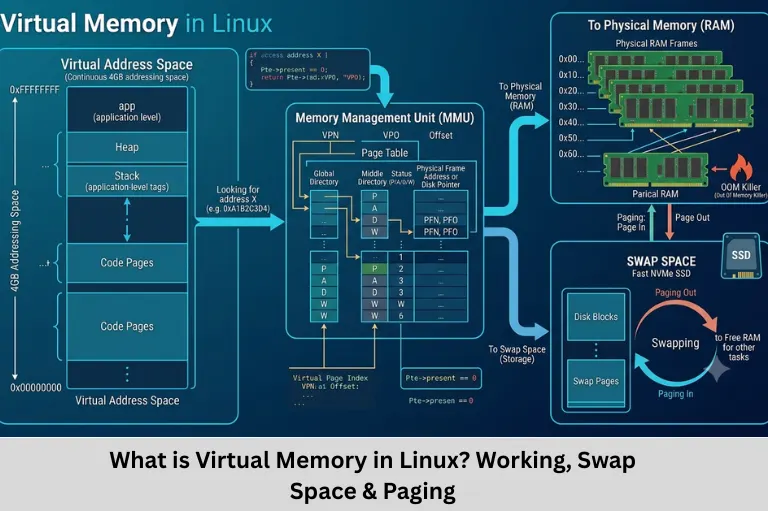
Learn what virtual memory is in Linux, how paging and swap space work, virtual memory management, swap files, swap partitions, and Linux memory concepts. Embedded Tech Development Academy (ETDA)
- What is Virtual Memory in Linux? Working, Swap Space & Paging
-
What is Virtual Memory in Linux? Complete Guide to Paging and Swap Space
- Introduction
- What is Virtual Memory?
- How Does Virtual Memory Work in Linux?
- What is Paging?
- What is Swap Space?
- Swap Partition vs Swap File
- What Happens When RAM Becomes Full?
- What is Swapping and Paging?
- Advantages of Virtual Memory
- Disadvantages of Virtual Memory
- Virtual Memory in Embedded Linux
- Virtual Memory and Linux System Programming
- How to Check Swap Usage in Linux
- Learning Outcomes
- Why Learn Linux Memory Management at Embedded Tech Development Academy?
- Conclusion
What is Virtual Memory in Linux? Complete Guide to Paging and Swap Space
Introduction
Virtual memory is one of the most important concepts in operating systems and Linux memory management. It allows a computer to provide programs with an address space that is larger and more flexible than the physical RAM installed in the system. Virtual memory works by using a combination of physical memory (RAM), disk-based storage, memory pages, page tables, address translation, and swap space to manage how applications access memory.
When a Linux system runs multiple applications simultaneously, the operating system must efficiently manage available memory. If physical RAM becomes heavily utilized, Linux can move some less-active memory pages from RAM to a designated area on storage called swap space. This releases physical memory for applications and other system operations. When those pages are required again, Linux can load them back into RAM.
This process is largely transparent to application programs. Applications work with virtual addresses, while the Linux kernel and hardware memory-management unit (MMU) handle the translation between virtual and physical addresses.
Virtual memory is closely related to several important operating-system concepts, including memory management, virtual address space, physical memory, paging, page tables, page faults, RAM utilization, swap space, swap files, swap partitions, memory allocation, and process isolation. Understanding these concepts is particularly important for students learning Linux system programming, operating systems, embedded Linux, and computer architecture.
For embedded engineers, knowledge of Linux virtual memory becomes especially valuable when working with embedded Linux boards, application processors, Internet of Things (IoT) gateways, and systems that run multiple processes. Although smaller microcontrollers generally use different memory-management approaches, Linux-based embedded systems rely heavily on operating-system memory management.
At Embedded Tech Development Academy (ETDA), students can build a strong foundation in Linux, operating systems, embedded programming, and system-level concepts through practical and industry-oriented training. As a Top Embedded Training Institute in Bangalore, Embedded Tech Development Academy (ETDA) focuses on developing practical skills that help learners understand both hardware and software aspects of embedded systems. The institute also provides assured placement support, helping students prepare for careers in embedded software, firmware, Linux, Internet of Things (IoT), and related technology domains.
This guide explains virtual memory in Linux, how paging works, what swap space means, the difference between swap files and swap partitions, and why virtual memory is important for Linux and embedded systems.
What is Virtual Memory?
Virtual memory is a memory-management technique that gives each process the appearance of having its own large and continuous memory address space.
The important idea is that the addresses used by an application are virtual addresses, not necessarily direct physical RAM addresses.
The operating system and processor work together to translate virtual addresses into physical addresses.
Virtual Address Space
Each process running on Linux generally has its own virtual address space.
This provides several benefits:
- Process isolation
- Efficient memory allocation
- Protection between processes
- Flexible memory management
- Support for shared libraries
- Ability to use memory beyond currently available physical RAM under appropriate conditions
Virtual Memory and Physical RAM
Physical RAM is the actual hardware memory installed in a computer.
Virtual memory is an abstraction created through operating-system and hardware mechanisms.
A simplified view is:
Application → Virtual Address → MMU/Page Tables → Physical RAM
If a required page is not currently in RAM, Linux may need to retrieve it from another backing store, such as swap.
Why is Virtual Memory Important?
Without virtual memory, managing many independent processes safely and efficiently would be significantly more difficult.
Virtual memory allows Linux to:
- Isolate processes
- Manage memory dynamically
- Support multitasking
- Use RAM efficiently
- Provide each process with its own address space
How Does Virtual Memory Work in Linux?
Linux uses a combination of hardware and software mechanisms to implement virtual memory.
When a program accesses memory, it uses a virtual address.
The processor’s Memory Management Unit (MMU) translates this virtual address into a physical address using page tables maintained by the operating system.
A simplified process is:
- Application generates a virtual memory access.
- CPU/MMU examines the address translation information.
- The corresponding physical memory location is identified.
- Data is accessed from RAM if the page is present.
- If the page is not available in RAM, a page fault can occur.
- Linux determines how to satisfy the request.
- If necessary, the required page can be brought into physical memory.
Role of the Linux Kernel
The Linux kernel manages:
- Process address spaces
- Page tables
- Physical memory
- Memory allocation
- Page faults
- Swapping/paging
- Memory protection
- Shared memory
- File-backed memory
Role of the MMU
The MMU is hardware that performs virtual-to-physical address translation.
It works closely with:
- Page tables
- Translation Lookaside Buffer (TLB)
- CPU privilege mechanisms
- Memory protection mechanisms
What is Paging?
Linux primarily uses paging rather than moving entire processes between RAM and disk.
Paging divides memory into fixed-size blocks called pages.
Physical memory is divided into corresponding units called page frames.
Pages and Page Frames
A virtual memory page can be mapped to a physical page frame.
For example:
Virtual Page → Physical Page Frame
The mapping is maintained through page tables.
Why Paging is Efficient
Paging allows Linux to move or manage only specific portions of a process’s memory rather than the entire process.
This provides greater flexibility.
For example, if an application has several megabytes of memory but only a small portion has not been used recently, Linux does not necessarily need to move the entire application out of RAM.
Page Size
The exact page size depends on the architecture and Linux configuration. Common systems use page sizes such as 4 KiB, but other configurations and architectures can use different sizes.
What is Swap Space?
Swap space is storage space that Linux can use as backing storage for memory pages under certain memory-management conditions.
Swap can be implemented using:
- A swap partition
- A swap file
When Linux needs to free physical RAM, eligible memory pages can be written to swap.
Later, when those pages are needed, Linux can read them back into RAM.
Why Does Linux Use Swap?
Swap can help Linux handle memory pressure.
For example, suppose a system has:
8 GB RAM + 4 GB swap
The 4 GB swap does not mean the system effectively has 12 GB of equally fast RAM.
Instead, swap provides additional backing storage for certain memory pages.
RAM vs Swap
RAM is significantly faster than storage-based swap.
Therefore:
RAM → Fast memory access
Swap → Much slower storage-based access
If a system continuously moves pages between RAM and swap, performance can degrade substantially.
Swap is Not a Replacement for RAM
Swap should not be viewed as equivalent to adding physical RAM.
It is primarily a mechanism that provides additional flexibility during memory pressure.
Swap Partition vs Swap File
Linux supports both swap partitions and swap files.
Swap Partition
A swap partition is a dedicated disk partition used for swap.
Advantages include:
- Dedicated swap area
- Simple long-term configuration
- Traditionally common in Linux installations
Disadvantages include:
- Changing its size can be less convenient
- Requires disk partition management
Swap File
A swap file is a regular file configured for use as swap.
Advantages include:
- Easy to create
- Easy to resize or remove
- Useful for testing or changing requirements
- Does not normally require repartitioning the disk
Which One Should You Use?
For many modern Linux systems, a swap file is a convenient choice because it is flexible.
A swap partition can also be appropriate when swap requirements are known and the system is being deliberately partitioned.
Can Linux Use Multiple Swap Areas?
Yes.
Linux can use multiple swap areas, including combinations of swap files and swap partitions, subject to system configuration.
This can be useful when different storage areas are available or when additional temporary swap capacity is required.
What Happens When RAM Becomes Full?
When physical memory becomes heavily utilized, Linux’s memory-management subsystem works to reclaim memory.
Possible actions include:
- Reclaiming clean file-backed pages
- Writing suitable anonymous pages to swap
- Reusing memory caches
- Managing inactive pages
- Terminating processes in severe memory-pressure situations through mechanisms such as the Out-Of-Memory (OOM) killer
Page Reclamation
Linux maintains memory caches that can sometimes be reclaimed when applications need more memory.
This means that seeing memory classified as “used” does not automatically mean all of it is permanently unavailable.
Page Faults
A page fault occurs when a process accesses a virtual memory page that is not currently mapped in the required way.
Not every page fault indicates a problem.
Some page faults are normal and expected.
Major and Minor Page Faults
A minor page fault can often be handled without reading data from disk.
A major page fault requires relatively expensive I/O, such as retrieving data from storage.
Why Excessive Page Faults Matter
Frequent major page faults can increase latency and reduce application performance, especially when storage is much slower than RAM.
What is Swapping and Paging?
Operating-system terminology distinguishes between swapping and paging.
Traditional swapping can refer to moving an entire process or large memory image to secondary storage.
Paging, on the other hand, moves memory in smaller fixed-size units.
Paging in Linux
Modern Linux memory management primarily works with pages rather than routinely moving entire processes out of RAM.
This allows finer-grained memory management.
Why Paging is Preferred
Paging provides:
- Better memory utilization
- More granular memory management
- Process isolation
- Flexible allocation
- Efficient multitasking
Linux Terminology
Historically, Linux documentation and everyday discussions may use terms such as “swapping” even when the underlying operation involves moving individual memory pages.
Advantages of Virtual Memory
Virtual memory provides several important benefits.
Efficient Memory Utilization
Linux can manage RAM dynamically and reclaim memory when required.
Multitasking
Virtual memory makes it practical to run many processes simultaneously.
Memory Protection
Page-table permissions can help enforce whether memory is:
- Readable
- Writable
- Executable
Larger Address Space
Applications can work within a large virtual address space even when the amount of physical RAM is smaller.
However, virtual address space should not be confused with guaranteed physical memory availability.
Disadvantages of Virtual Memory
Virtual memory also introduces certain costs.
Performance Overhead
Address translation and page-table management require hardware and operating-system resources.
Storage is Slower Than RAM
Accessing swap storage is considerably slower than accessing physical RAM.
Thrashing
When the system spends excessive time moving pages between RAM and storage instead of performing useful application work, the system may experience thrashing.
Causes of Thrashing
Thrashing can occur when:
- Too many memory-intensive applications are running
- Available RAM is insufficient
- Working sets do not fit efficiently in memory
- The system is under severe memory pressure
How to Reduce Memory Pressure
Possible approaches include:
- Adding more RAM
- Reducing unnecessary applications
- Optimizing software memory usage
- Investigating memory leaks
- Adjusting workloads
- Monitoring system memory behavior
Virtual Memory in Embedded Linux
Virtual memory is particularly important in embedded Linux systems that use processors with MMU support.
Examples include:
- ARM-based application processors
- Embedded development boards
- Internet of Things (IoT) gateways
- Industrial computers
- Network appliances
- Smart devices
Embedded Linux vs Microcontroller Systems
A traditional microcontroller such as a Cortex-M-based MCU may operate without an MMU and full virtual-memory subsystem.
Embedded Linux systems running on processors with MMUs can provide:
- Virtual address spaces
- Process isolation
- Memory protection
- Demand paging
- Shared libraries
Why Embedded Engineers Should Learn Virtual Memory
Understanding virtual memory helps engineers troubleshoot:
- Memory allocation problems
- Segmentation faults
- Page faults
- Memory leaks
- Application crashes
- High memory usage
- Performance problems
Relevance to Embedded Systems Training
Virtual memory is an important topic for learners progressing from basic microcontroller programming toward Embedded Linux, Linux device drivers, system programming, and application development.
Virtual Memory and Linux System Programming
Virtual memory directly affects Linux application development.
System programmers need to understand concepts such as:
malloc()free()mmap()- Process address spaces
- Shared memory
- Memory-mapped files
- Page faults
- Memory protection
Dynamic Memory Allocation
Functions such as malloc() allow applications to request memory dynamically.
The C library and Linux kernel work together to manage these requests.
Memory Mapping
The mmap() system call allows processes to map files or other objects into their virtual address spaces.
This can be useful for:
- File access
- Shared memory
- Device interfaces
- Efficient data handling
How to Check Swap Usage in Linux
Linux provides several commands for observing memory and swap usage.
Using free
The free command provides an overview of RAM and swap usage.
Example:
free -hUsing swapon
The swapon command can display active swap areas.
Example:
swapon --showUsing /proc/meminfo
Linux exposes memory-related information through:
cat /proc/meminfoWhy Monitoring Matters
Monitoring memory helps engineers identify:
- Memory pressure
- High swap usage
- Application memory consumption
- Potential performance problems
Performance Analysis
For deeper analysis, engineers can combine memory information with tools such as:
tophtopvmstatpssar
Learning Outcomes
After studying virtual memory and Linux memory management, learners should be able to:
- Explain virtual memory.
- Differentiate virtual and physical memory.
- Understand paging.
- Explain page tables and address translation.
- Describe swap space.
- Differentiate swap files and partitions.
- Understand page faults.
- Explain memory pressure.
- Identify the effects of excessive swapping.
- Understand the relevance of virtual memory in Embedded Linux.
Why Learn Linux Memory Management at Embedded Tech Development Academy?
A strong understanding of Linux memory management can help embedded engineers move beyond basic microcontroller programming toward more advanced system-level development.
At Embedded Tech Development Academy (ETDA), learners can explore practical topics related to:
- Embedded Linux
- Linux system programming
- C programming
- ARM architecture
- Operating systems
- Device drivers
- Memory management
- Embedded networking
- RTOS concepts
- Internet of Things (IoT) development
As a Top Embedded Training Institute in Bangalore, Embedded Tech Development Academy (ETDA) emphasizes practical and industry-oriented learning. Students can develop the technical foundation needed to understand how hardware, operating systems, and application software interact.
Embedded Tech Development Academy (ETDA) also provides assured placement support, helping learners prepare for technical interviews, improve practical skills, and pursue opportunities in embedded software and related engineering roles.
FAQs
What is virtual memory in Linux?
Virtual memory is a Linux memory-management mechanism that provides processes with virtual address spaces and allows the operating system to manage physical RAM efficiently. Under memory pressure, Linux may also use swap space to store certain memory pages.
What is the difference between virtual memory and physical memory?
Physical memory refers to the actual RAM installed in the computer. Virtual memory is an abstraction provided by the operating system and hardware that gives processes virtual address spaces and maps those addresses to physical memory or appropriate backing storage.
What is swap space in Linux?
Swap space is storage that Linux can use as backing storage for certain memory pages. It can be configured as either a dedicated swap partition or a swap file. Swap is slower than RAM and is primarily useful for handling memory pressure.
Is swap the same as RAM?
No. Swap is not a replacement for RAM. Storage-based swap is significantly slower than physical memory. It provides additional flexibility when managing memory but cannot deliver the same performance as adding more RAM.
Why is virtual memory important for Embedded Linux?
Virtual memory allows Embedded Linux systems running on suitable MMU-equipped processors to provide process isolation, memory protection, virtual address spaces, shared libraries, and sophisticated memory management. Understanding these concepts is important for engineers working with Embedded Linux applications, system programming, and device drivers.
Conclusion
Virtual memory is a fundamental Linux operating-system concept that enables efficient memory management, process isolation, multitasking, and flexible use of physical memory. Instead of requiring every application to work directly with physical RAM, Linux provides processes with virtual address spaces and uses hardware mechanisms such as the MMU and page tables to translate virtual addresses into physical memory locations.
When physical memory becomes constrained, Linux can reclaim memory and, where appropriate, use swap space as backing storage for certain memory pages. Swap can be implemented using either a swap partition or swap file, and Linux can support multiple swap areas. However, swap should not be considered a substitute for physical RAM because storage access is much slower than RAM access.
Understanding paging, page faults, virtual address space, physical memory, page tables, memory allocation, swap space, memory reclamation, RAM utilization, and Linux memory management is essential for anyone interested in Linux system programming or Embedded Linux. These concepts help engineers understand why applications experience memory-related performance issues and how the Linux kernel manages resources behind the scenes.
For embedded engineers, virtual memory becomes especially relevant when working with Linux-based embedded platforms, Internet of Things (IoT) gateways, industrial computers, and ARM application processors. Learning how memory is translated, protected, allocated, reclaimed, and backed by storage gives engineers a deeper understanding of system-level software.
At Embedded Tech Development Academy (ETDA), students can develop this foundation through practical learning in Linux, Embedded Linux, C programming, ARM architecture, operating systems, device drivers, and embedded systems development. As a Top Embedded Training Institute in Bangalore, Embedded Tech Development Academy (ETDA) focuses on industry-oriented technical training and practical project exposure. With assured placement support, students can also receive career-oriented preparation for opportunities in embedded software, Linux, firmware, Internet of Things (IoT), and related domains.
Learning virtual memory is therefore not simply about understanding how Linux uses disk space when RAM is insufficient. It provides a deeper understanding of how an operating system manages memory, processes, hardware resources, performance, and security—knowledge that is highly valuable for students preparing for modern embedded and Linux-based engineering careers.
Author: ETDA Trainers
Experience: 10+ Years of Industry Experience in Embedded Systems, IoT, and Embedded C Programming