
Linux File Permissions: chmod, chown & Security
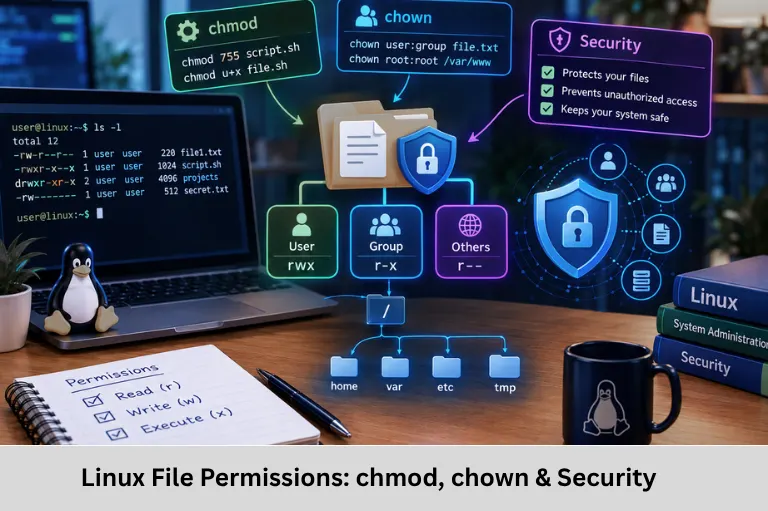
Learn Linux file permissions, ownership, chmod, chown, chgrp, octal permissions, umask, SUID, SGID, sticky bit and security practices. Embedded Tech Development Academy (ETDA).
- Linux File Permissions: chmod, chown & Security
-
Mastering File Permissions in Linux: Ownership, chmod and Security
- Introduction to Linux File Permissions
- Understanding Linux File Ownership
- Linux File Permission Types
- Reading the Linux Permission String
- Numeric or Octal Linux Permissions
- Changing Permissions with chmod
- Changing Ownership with chown and chgrp
- umask and Default Permissions
- Special Linux Permissions
- File Permissions in Embedded Linux
- Linux Permission Auditing
- Frequently Asked Questions
- Conclusion
Mastering File Permissions in Linux: Ownership, chmod and Security
Introduction to Linux File Permissions
Linux is widely used in servers, cloud infrastructure, development environments, networking equipment, and embedded systems because it provides strong process isolation, multi-user support, and fine-grained access control. One of the fundamental security mechanisms behind this model is the Linux file permission system.
Every file and directory in Linux has an owner, an associated group, and a permission set that determines which users can read, modify, execute, or access it. Understanding file ownership, chmod, chown, chgrp, octal permissions, umask, SUID, SGID, and the sticky bit is essential for system administration and secure software deployment.
File permissions are particularly important in embedded systems running Embedded Linux because firmware binaries, startup scripts, configuration files, device nodes, logs, and application files may require different access levels.
Embedded Tech Development Academy (ETDA) provides practical training in Linux, Embedded Linux, programming, microcontrollers, and embedded systems development. Learners looking for a Top Embedded Training Institute in Bangalore can build these skills through technical training with assured placement support.
Understanding Linux File Ownership
User, Group and Others
Linux uses three primary ownership categories:
User or Owner
The user is normally the account that owns the file. The owner can have a different permission set from other users.
Checking Ownership
The ls -l command displays ownership:
ls -l application.binA typical result may look like:
-rwxr-xr-- 1 developer embedded 24576 Sep 30 09:30 application.binHere, developer is the owner and embedded is the group.
Group Ownership
A group allows multiple users to share a common permission set. This is useful for development teams working on source code, binaries, configuration files, and deployment directories.
Others
Others means users who are neither the file owner nor members of the associated group. They can still have permissions if explicitly granted.
Linux File Permission Types
Linux uses three basic permissions: read, write, and execute.
Read Permission – r
For Files
Read permission allows a process to read the contents of a file.
Example
cat config.txtWithout read permission, a normal user cannot read the file contents.
For Directories
Read permission on a directory allows the user to list directory entries.
Write Permission – w
Write permission allows modification of file contents. For directories, write permission allows creation, deletion, and renaming of entries, subject to other restrictions.
Execute Permission – x
Execute permission allows a file to be executed as a program when the file format and interpreter requirements are satisfied.
For directories, execute means search or traversal permission. It allows access to entries when their names are known and the required permissions are present.
Reading the Linux Permission String
Understanding -rwxr-xr--
Consider:
-rwxr-xr--Permission Structure
The first character represents the file type:
-    regular file
d    directory
l    symbolic link
The remaining nine characters are divided into three groups:
rwx | r-x | r--
user | group | others
Interpreting the Example
The owner has:
rwxThe group has:
r-xOthers have:
r--Therefore, the owner can read, write, and execute; the group can read and execute; and others can only read.
Numeric or Octal Linux Permissions
Permission Values
Linux represents permissions numerically:
| Permission | Value |
|---|---|
Read r | 4 |
Write w | 2 |
Execute x | 1 |
Calculating Permission Values
For example:
rwx = 4 + 2 + 1 = 7
r-x = 4 + 0 + 1 = 5
r-- = 4 + 0 + 0 = 4
Understanding 754
Therefore:
754 = rwxr-xr--This means owner permissions are rwx, group permissions are r-x, and others have r--.
Changing Permissions with chmod
Numeric chmod
The chmod command changes file permissions.
Example
chmod 754 file.txtThis assigns:
Owner  = rwx
Group  = r-x
Others = r--
Symbolic chmod
Permissions can also be modified symbolically:
chmod u+x script.sh
chmod g-w project.txt
chmod o-r confidential.txt
Here:
u= user/ownerg= groupo= othersa= all
Recursive Permissions
For directories:
chmod -R 755 project/Use Recursive chmod Carefully
Recursive permission changes can unintentionally modify permissions on thousands of files. For production embedded systems, scripts, configuration directories, and application trees should be handled carefully.
Changing Ownership with chown and chgrp
Using chown
The chown command changes ownership:
sudo chown developer application.binOwner and group can be changed together:
sudo chown developer:embedded application.binUsing chgrp
The chgrp command changes group ownership:
sudo chgrp embedded application.binWhy Ownership Matters
Correct ownership prevents unauthorized modification of binaries, configuration files, logs, and service resources.
umask and Default Permissions
Understanding umask
The umask controls which permission bits are removed from default permissions when new files and directories are created.
Checking umask
umaskA common value is:
0022Security Relevance
Understanding umask is important when applications automatically create configuration files, logs, temporary files, or generated data.
Special Linux Permissions
SUID
The Set User ID (SUID) permission causes an executable to run with the effective user ID of its owner.
Example:
chmod 4755 programSGID
Set Group ID (SGID) can affect executable behavior and directory group inheritance.
chmod 2775 shared/For directories, newly created files can inherit the directory’s group.
Sticky Bit
The sticky bit is commonly used on shared directories such as /tmp.
chmod 1777 shared/Deletion Protection
The sticky bit generally restricts users from deleting or renaming files owned by other users within a shared directory.
Security Consideration
Special permissions should be audited carefully because incorrectly configured SUID or SGID executables can create security risks.
File Permissions in Embedded Linux
Embedded Systems Security
Linux permissions are highly relevant to embedded systems. An Embedded Linux device may contain:
- Firmware executables
- Startup scripts
- Device nodes
- Configuration files
- System logs
- Application binaries
- Network service files
Practical Example
A firmware executable might require:
rwxr-xr-xwhile a sensitive configuration file may require:
rw-------Principle of Least Privilege
The system should grant only the permissions required by each application, service, and user. Avoid blindly using:
chmod 777because it grants read, write, and execute permissions to everyone.
Linux Permission Auditing
Finding World-Writable Files
Administrators can search for files writable by others:
find /path -type f -perm -o+wThis can help identify unnecessarily broad permissions.
Extended ACLs
For more detailed access control, Linux also supports Access Control Lists (ACLs).
Commands such as:
getfacl file.txt
setfacl -m u:testuser:r file.txt
allow permissions beyond the traditional owner/group/others model.
Frequently Asked Questions
What are Linux file permissions?
Linux file permissions define whether users can read, write, or execute files and access directories.
What does chmod 755 mean?
chmod 755 gives the owner rwx, while the group and others receive r-x.
What is the difference between chmod and chown?
chmod changes permissions, while chown changes file ownership.
Why should chmod 777 be avoided?
777 grants read, write, and execute permissions to everyone. This can unnecessarily increase security exposure.
Why are Linux permissions important in embedded systems?
They control access to firmware, applications, configuration files, logs, device resources, and services, helping protect embedded systems from unauthorized modification or access.
Conclusion
Mastering Linux file permissions is essential for anyone working with Linux administration, software deployment, DevOps, cybersecurity, Embedded Linux, and embedded systems. The basic model of User, Group, and Others, combined with r, w, and x, provides the foundation for controlling access to files and directories.
Commands such as chmod, chown, chgrp, umask, find, getfacl, and setfacl allow engineers to implement and audit access control at different levels. Understanding octal permissions such as 755, 644, and 754, along with special permissions such as SUID, SGID, and sticky bit, is particularly important when developing production Linux applications.
For embedded systems, incorrect permissions can cause application failures, boot problems, service errors, or security vulnerabilities. Engineers therefore need to understand not only how to change permissions but also why a particular permission set is required.
Embedded Tech Development Academy (ETDA) focuses on practical technical learning across Linux, Embedded Linux, programming, microcontrollers, and embedded systems. Students looking for a Top Embedded Training Institute in Bangalore can develop these industry-relevant skills through hands-on technical training with assured placement support.
Linux file permissions should always be implemented according to the principle of least privilege: provide the minimum access required for a user, process, or service to perform its function. Embedded Tech Development Academy (ETDA) helps learners connect Linux fundamentals with practical embedded systems development, while a Top Embedded Training Institute in Bangalore environment can provide structured technical learning with assured placement support.
For engineers working with firmware, IoT gateways, industrial controllers, robotics platforms, automotive Linux systems, or other embedded systems, strong Linux permission knowledge is a practical security skill rather than merely a command-line topic. With systematic training, learners can understand Linux security, file ownership, access control, shell commands, and deployment practices. Embedded Tech Development Academy (ETDA) supports this practical learning approach with assured placement support, making Linux and Embedded Linux skills relevant for learners targeting technical careers through a Top Embedded Training Institute in Bangalore.
Author: ETDA Trainers
Experience: 10+ Years of Industry Experience in Embedded Systems, IoT, and Embedded C Programming