
Understanding the Shell in Linux: Types, Working, Commands & Scripting
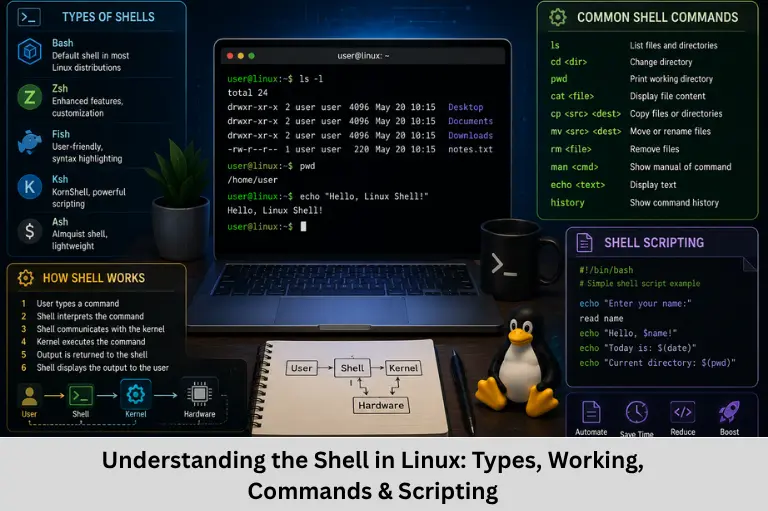
Learn what the Linux shell is, how it works with the kernel, types of shells, shell scripting, process management, pipes, redirection, and job control.
- Understanding the Shell in Linux: Types, Working, Commands & Scripting
- Understanding the Shell in Linux: A Complete Technical Guide
Understanding the Shell in Linux: A Complete Technical Guide
When you open a Linux terminal, you typically see a prompt waiting for a command. You may type ls, cd, pwd, or mkdir, and Linux immediately performs the requested operation. The program responsible for interpreting these commands and providing the command-line interface is the shell.
The Linux shell is much more than a command interpreter. It provides an interface between the user and the operating system and supports command execution, process management, file-system operations, environment variables, input/output redirection, pipelines, job control, and shell scripting. It is also one of the most important tools for system administrators, developers, DevOps engineers, and embedded Linux developers.
When a command is entered, the shell parses the command, performs expansions, searches for the executable when necessary, and starts or invokes the appropriate program. For external commands, this commonly involves process-related system calls such as fork()/execve() or equivalent mechanisms, depending on the shell and operating system implementation. Built-in commands such as cd can be handled directly by the shell because they need to modify the shell’s own state.
Understanding Linux shell commands, Bash shell, shell scripting, command-line interface, Linux process management, environment variables, system calls, pipes, redirection, and job control provides a strong foundation for working with Linux systems.
For embedded engineers, shell knowledge is especially useful when working with embedded Linux, cross-compilation, GCC toolchains, build systems, Make, CMake, Git, debugging tools, and target-device configuration. Embedded Tech Development Academy (ETDA) focuses on practical technical learning in embedded systems, Linux, C/C++, and related technologies. As a Top Embedded Training Institute in Bangalore, Embedded Tech Development Academy (ETDA) helps learners develop practical skills along with assured placement support.
Learning Linux shell fundamentals at Embedded Tech Development Academy (ETDA), a Top Embedded Training Institute in Bangalore, can help aspiring engineers understand the development environment used in real-world software and embedded projects while receiving assured placement support.
What Is a Shell in Linux?
A shell is a software program that provides a command-line interface between the user and the operating system.
When you enter:
lsthe shell interprets the command and executes the corresponding program or shell builtin.
Basic Command Execution Flow
The simplified process is:
User → Shell → Operating System → Program → Output
For an external command, the shell generally:
- Reads the command.
- Parses its syntax.
- Performs expansions and substitutions.
- Locates the executable.
- Creates or manages a process.
- Waits for the process when appropriate.
- Displays the resulting output.
Shell as a Command Interpreter
The shell interprets shell syntax rather than simply passing every line directly to the kernel. Features such as variables, wildcards, pipes, redirection, command substitution, and conditional execution are processed by the shell.
Why Do We Need a Shell?
The Linux kernel provides low-level operating-system services but does not directly provide a human-friendly command language such as ls or cd.
Major Functions of a Shell
A shell provides:
- Command-line interaction
- Program execution
- File and directory operations
- Process management
- Environment-variable handling
- Input/output redirection
- Pipeline creation
- Job control
- Shell scripting
- Command history and aliases
Shell and System Calls
The shell ultimately relies on operating-system interfaces to perform many operations. External commands are executed as processes, while shell builtins may use system calls directly.
For example, cd is normally implemented as a shell builtin because changing the working directory of a separate child process would not change the parent shell’s directory.
Types of Shells in Linux
Several Unix and Linux shells have been developed over time.
Bourne Shell (sh)
The Bourne shell is one of the historically important Unix shells and influenced the syntax of many later shells.
Bash
Bash (Bourne Again SHell) is one of the most widely used shells on Linux systems. It provides command history, scripting capabilities, functions, variables, job control, command completion, and many other features.
C Shell (csh)
C shell introduced syntax influenced by the C programming language and provides interactive features and scripting capabilities.
Korn Shell (ksh)
KornShell provides advanced scripting and interactive capabilities and has been used extensively in Unix environments.
Z Shell (zsh)
Zsh provides extensive customization and interactive features and is popular among developers.
Listing Available Shells
The shells configured as valid login shells can commonly be listed using:
cat /etc/shellsChecking the Default Shell
You can inspect the SHELL environment variable:
echo "$SHELL"However, this variable represents the user’s configured shell and should not always be treated as definitive proof of the currently executing shell.
How the Linux Shell Works Internally
Consider the command:
ls -lCommand Parsing
The shell first parses the command line into the command name and its arguments.
For:
ls -lls is the command and -l is an argument.
Command Lookup
For an external command, the shell searches directories listed in the PATH environment variable.
You can view PATH using:
echo "$PATH"Process Creation and Execution
The shell starts the external program using operating-system process mechanisms. Traditionally, Unix shells commonly use fork() followed by an exec-family system call.
Conceptually:
Shell → fork() → Child Process → exec() → Program
The child process becomes the requested program, while the shell can wait for it to finish or continue immediately for background jobs.
Kernel Interaction
The kernel manages resources such as:
- CPU scheduling
- Virtual memory
- File descriptors
- Processes
- Devices
- Networking
The shell uses system calls and kernel services to perform many of these operations.
Built-in Commands
Not every shell command launches a new process.
Commands such as:
cd
export
unset
are commonly shell builtins because they modify the shell’s own execution environment.
Shell vs Terminal vs Kernel
These three components are often confused.
Kernel
The kernel is the core component of the operating system. It manages hardware and system resources and provides system-call interfaces.
Shell
The shell is a command interpreter that provides a user-facing command-line environment.
Terminal
A terminal emulator is the application through which you interact with a shell. Examples include GNOME Terminal, Konsole, and xterm.
Simple Analogy
You can think of them as:
- Kernel = Engine
- Shell = Driver
- Terminal = Interface
The analogy is simplified, but it helps distinguish their roles.
Shell Scripting
One of the most powerful features of a shell is scripting. A shell script stores commands in a file so that they can be executed repeatedly.
Basic Bash Script
#!/bin/bash

echo "Hello, $USER"
echo "Today is $(date)"
Save it as hello.sh.
Then make it executable:
chmod +x hello.shExecute it:
./hello.shShell Script Capabilities
Bash scripts can support:
- Variables
- Conditions
- Loops
- Functions
- Command substitution
- File processing
- Process control
- Exit-status handling
Shell scripting is widely used for automation, system administration, build processes, testing, and deployment.
Important Features of Modern Shells
Command History
Bash maintains command history.
historyCommands such as !! can repeat the previous command.
Tab Completion
Pressing Tab can complete command names, paths, and filenames where supported.
Wildcards
Wildcards allow patterns to match filenames.
For example:
ls *.ccan list files ending with .c.
Pipes
A pipe sends the standard output of one command to the standard input of another.
ls | grep ".c"This creates a processing chain between commands.
Redirection
Output can be redirected to a file:
ls > files.txtInput can also be redirected using <, while >> appends output rather than replacing the file.
Job Control in Linux Shell
Shells can manage foreground and background processes.
Background Execution
Use &:
long_task &The command runs as a background job.
Foreground and Background Commands
Common job-control commands include:
jobs
fg
bg
These allow users to inspect and control shell-managed jobs.
Why Multiple Shells Exist
Different shells provide different combinations of scripting syntax, interactive features, portability, customization, and historical compatibility.
Choosing a Shell
The appropriate shell depends on the task.
shis useful for portability.- Bash is widely used for Linux administration and scripting.
- Zsh emphasizes interactive customization.
- ksh remains relevant in certain Unix environments.
The important skill is understanding shell fundamentals rather than depending entirely on one particular shell.
Frequently Asked Questions
What is a shell in Linux?
A shell is a command interpreter that provides a command-line interface for interacting with the Linux operating system. It interprets commands, executes programs, manages jobs, and provides scripting capabilities.
What is the difference between a shell and a terminal?
A terminal emulator is the application that provides the interface for entering and displaying text. The shell is the program running inside that terminal that interprets and executes commands.
What is Bash in Linux?
Bash stands for Bourne Again SHell. It is a widely used Linux shell that provides command execution, scripting, variables, functions, history, job control, and other interactive features.
What does PATH do in Linux?
PATH is an environment variable containing directories that the shell searches when locating executable commands. It allows users to run commands without specifying their complete filesystem path.
What is shell scripting used for?
Shell scripting is used to automate repetitive tasks such as file management, system administration, software builds, testing, deployment, backups, environment configuration, and embedded Linux development.
Conclusion
The Linux shell is a fundamental component of the command-line environment. It provides an interface through which users can execute programs, manipulate files, manage processes, configure environment variables, connect commands with pipelines, redirect input and output, and automate repetitive tasks using shell scripts.
Understanding how a shell works internally is equally important. When an external command is executed, the shell parses the command, performs expansions, searches the PATH, and starts the required program through operating-system process mechanisms. At the same time, shell builtins such as cd, export, and unset can modify the state of the current shell directly.
For developers and embedded engineers, knowledge of Linux shell commands, Bash scripting, process management, system calls, environment variables, file descriptors, pipes, redirection, and embedded Linux development is highly valuable. These skills are regularly used while configuring toolchains, compiling software, managing source code, automating builds, debugging systems, and interacting with embedded Linux targets.
Embedded Tech Development Academy (ETDA) provides practical technical training covering embedded systems, Linux, C/C++, operating-system concepts, and software development. As a Top Embedded Training Institute in Bangalore, Embedded Tech Development Academy (ETDA) emphasizes hands-on technical learning and offers assured placement support to career-focused learners.
For students and professionals aiming to develop strong embedded and Linux skills, Embedded Tech Development Academy (ETDA), a Top Embedded Training Institute in Bangalore, can provide practical exposure to Linux development workflows and technical programming concepts together with assured placement support. Building a strong foundation in shell programming and Linux internals can significantly improve an engineer’s ability to work with modern software and embedded development environments.
Author: ETDA Trainers
Experience: 10+ Years of Industry Experience in Embedded Systems, IoT, and Embedded C Programming