
Using FreeRTOS on Arduino: Multitasking & Task Scheduling Guide
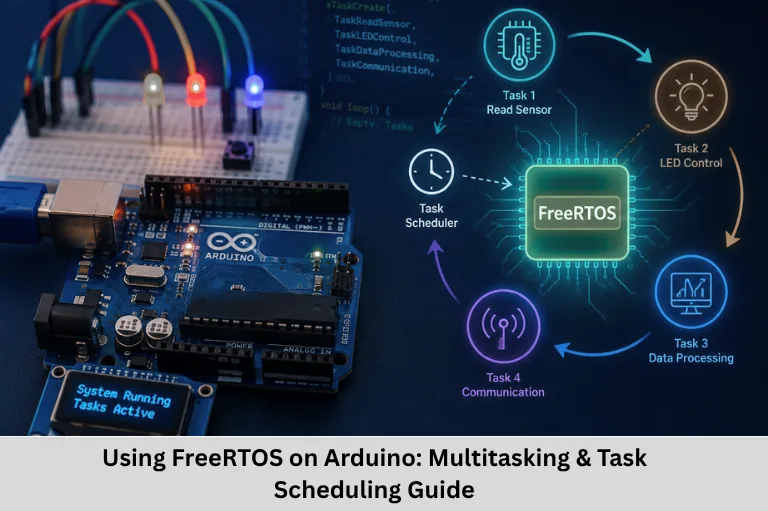
Learn how to use FreeRTOS on Arduino for multitasking, task scheduling, priorities, queues, semaphores, task synchronization, and real-time embedded applications. Embedded Tech Development Academy (ETDA).
- Using FreeRTOS on Arduino: Multitasking & Task Scheduling Guide
-
Using FreeRTOS to Multitask: Managing Several Activities on an Arduino
- What Is a Real-Time Operating System (RTOS)?
- Fundamental FreeRTOS Concepts
- Requirements for Running FreeRTOS on Arduino
- Creating and Managing FreeRTOS Tasks
- Priority and Task Scheduling
- Inter-Task Communication Using Queues
- Synchronization with Semaphores and Mutexes
- Task Notifications
- Context Switching in FreeRTOS
- Debugging FreeRTOS Applications
- Best Practices for Arduino FreeRTOS Development
- Conclusion
Using FreeRTOS to Multitask: Managing Several Activities on an Arduino
Modern embedded applications rarely perform only one operation. An Arduino-based system may need to read sensors, process data, control motors, monitor buttons, update a display, communicate through UART, and send information over a network at the same time. Implementing all these operations inside a single loop() function can make firmware difficult to maintain and can cause one blocking operation to delay other activities.
This is where FreeRTOS on Arduino becomes useful. FreeRTOS is a lightweight real-time operating system kernel that provides task management, scheduling, synchronization, inter-task communication, and timing services for resource-constrained microcontrollers. Instead of placing every operation into one sequential program flow, developers can divide application functionality into independent RTOS tasks.
For engineers learning embedded systems programming, real-time operating systems, Arduino multitasking, microcontroller programming, task scheduling, and embedded firmware development, FreeRTOS provides an important practical understanding of how professional embedded software is structured.
At Embedded Tech Development Academy (ETDA), students can strengthen these concepts through practical embedded development and real-time programming exercises. As a Top Embedded Training Institute in Bangalore, Embedded Tech Development Academy (ETDA) focuses on technical learning, hands-on projects, and assured placement support for learners preparing for embedded software careers. Understanding FreeRTOS task scheduling is particularly valuable for engineers targeting automotive, industrial automation, Internet of Things (IoT), robotics, and consumer electronics applications.
What Is a Real-Time Operating System (RTOS)?
A Real-Time Operating System (RTOS) is an operating-system kernel designed to manage tasks while providing predictable timing behavior. Unlike a general-purpose operating system, an RTOS is optimized for applications where response time and task execution are important.
Important RTOS Features
Multitasking
Multitasking allows multiple independent tasks to share CPU processing time. A microcontroller with a single CPU core does not literally execute multiple instructions simultaneously; instead, the scheduler rapidly switches between tasks.
Deterministic Scheduling
An RTOS attempts to provide predictable task response and scheduling behavior. This is important in systems where specific operations must execute within defined timing constraints.
Preemptive Scheduling
In preemptive scheduling, a higher-priority ready task can interrupt a lower-priority task. This allows time-sensitive operations to receive CPU attention quickly.
Inter-Task Communication
FreeRTOS provides mechanisms such as queues, semaphores, mutexes, and task notifications for exchanging information and coordinating tasks.
Task Synchronization
Synchronization mechanisms prevent race conditions and coordinate operations when multiple tasks access shared resources.
Fundamental FreeRTOS Concepts
FreeRTOS applications are built around several core concepts.
Tasks
A FreeRTOS task is similar to a lightweight thread. Each task has its own execution context, stack, state, and priority.
Tasks can be created using the xTaskCreate() API.
FreeRTOS Scheduler
The scheduler determines which ready task should execute. In a preemptive configuration, the scheduler generally selects the highest-priority ready task.
If multiple ready tasks have the same priority, time slicing can allow them to share processor time.
RTOS Tick Interrupt
FreeRTOS maintains a system tick used for time management and scheduling. The tick is normally generated periodically by a hardware timer.
The exact hardware mechanism depends on the microcontroller architecture. For example, Cortex-M devices commonly use SysTick, while AVR-based implementations may use a hardware timer.
Requirements for Running FreeRTOS on Arduino
Before developing a FreeRTOS-based Arduino application, developers generally need:
- Arduino IDE
- A compatible microcontroller board
- Appropriate FreeRTOS implementation or library
- USB connection and board drivers
- Basic knowledge of C/C++ programming
- Understanding of GPIO, timers, interrupts, and serial communication
Supported implementations vary by Arduino platform. AVR boards such as Arduino Uno have considerably fewer RAM resources than more powerful boards such as ESP32 or STM32 devices.
Installing FreeRTOS
Arduino IDE Setup
Open the Arduino IDE and navigate to the Library Manager.
Select:
Sketch → Include Library → Manage Libraries
Search for a FreeRTOS-compatible library suitable for the selected board and install the appropriate implementation.
Platform Considerations
FreeRTOS support differs between Arduino platforms. ESP32 development environments commonly provide FreeRTOS functionality as part of the underlying ESP-IDF architecture, while AVR and other platforms may require a compatible FreeRTOS port or library.
Always verify that the selected FreeRTOS implementation matches the target microcontroller architecture.
Creating and Managing FreeRTOS Tasks
A basic task typically contains an infinite loop because the scheduler controls when the task gets processor time.
A simplified structure is:
void TaskFunction(void *parameter)
{
    while (1)
    {
        // Task operation

        vTaskDelay(pdMS_TO_TICKS(100));
    }
}
A task can be created using:
xTaskCreate(
    TaskFunction,
    "SensorTask",
    128,
    NULL,
    1,
    NULL
);
Understanding xTaskCreate Parameters
The parameters generally represent:
- Task function
- Task name
- Stack depth
- Parameter passed to the task
- Task priority
- Task handle
The exact stack-depth interpretation depends on the FreeRTOS port.
Priority and Task Scheduling
Task priority determines the relative importance of ready tasks.
For example, an embedded application could contain:
- Priority 3: Emergency monitoring task
- Priority 2: Sensor processing task
- Priority 1: Display update task
If the emergency monitoring task becomes ready while a lower-priority task is executing, the scheduler can preempt the lower-priority task when preemption is enabled.
Using vTaskDelay()
vTaskDelay() places the calling task into the Blocked state for a specified number of RTOS ticks.
For example:
vTaskDelay(pdMS_TO_TICKS(100));This is preferable to using a long blocking delay inside an RTOS task because other ready tasks can execute while the current task is blocked.
Cooperative vs Preemptive Scheduling
FreeRTOS can be configured for different scheduling behavior. In preemptive scheduling, the kernel can switch to a higher-priority ready task automatically. Cooperative configurations require tasks to yield appropriately.
Inter-Task Communication Using Queues
FreeRTOS queues provide a thread-safe mechanism for transferring data between tasks.
A common producer-consumer architecture is:
Sensor Task → Queue → Processing Task
The sensor task collects data and sends it to a queue. Another task receives the data and performs calculations.
Typical APIs include:
xQueueCreate()
xQueueSend()
xQueueReceive()
Queues are particularly useful for transferring sensor readings, commands, event structures, and communication packets.
Synchronization with Semaphores and Mutexes
Semaphores
Binary semaphores can be used for task synchronization or event signaling. Counting semaphores can track multiple available resources or events.
Mutexes
A mutex is primarily used for protecting shared resources.
For example, if two tasks access the same UART interface, a mutex can prevent both tasks from writing to the peripheral simultaneously.
Task Notifications
Task notifications provide a lightweight method for signaling or communicating with a task. They can require fewer resources than some traditional synchronization mechanisms.
They are useful when an ISR or another task needs to notify a specific task that an event has occurred.
Context Switching in FreeRTOS
During a context switch, FreeRTOS preserves the execution context of the current task and restores the context of another task.
What Happens During a Context Switch?
The process generally involves:
- Saving processor registers and stack information.
- Updating the current task information.
- Selecting the next ready task.
- Restoring its processor context.
- Returning execution to the selected task.
The low-level implementation is architecture-dependent and commonly uses assembly routines for efficient register and stack management.
Debugging FreeRTOS Applications
Debugging an RTOS application requires attention to timing, stack usage, synchronization, and task states.
Stack Monitoring
Insufficient stack allocation can cause unpredictable behavior. The uxTaskGetStackHighWaterMark() API can help determine how much stack space remains available.
Serial Debugging
Excessive Serial.print() operations can affect timing and task execution, particularly on resource-constrained microcontrollers. Debug output should therefore be controlled and minimized in timing-sensitive applications.
Best Practices for Arduino FreeRTOS Development
Use RTOS Delays
Use vTaskDelay() rather than conventional blocking delays inside FreeRTOS tasks.
Keep ISRs Short
Interrupt Service Routines should perform only time-critical operations. Complex processing should normally be deferred to an RTOS task through a queue, semaphore, or notification.
Divide Firmware into Logical Tasks
Separate functionality into manageable tasks such as:
- Sensor acquisition
- Motor control
- Communication
- User interface
- Data processing
This improves code organization and maintainability.
FAQs
What is FreeRTOS used for in Arduino?
FreeRTOS can be used to divide an Arduino application into multiple tasks and manage their execution using task priorities, scheduling, delays, and synchronization mechanisms.
Can Arduino Uno run FreeRTOS?
Yes, compatible FreeRTOS ports can run on Arduino Uno-class AVR microcontrollers. However, the Uno has limited RAM and processing resources, so task count, stack sizes, and memory usage must be carefully managed.
What is the difference between delay() and vTaskDelay()?
delay() blocks the conventional Arduino execution flow, whereas vTaskDelay() blocks only the calling FreeRTOS task and allows other ready tasks to execute.
Why are queues used in FreeRTOS?
Queues provide a thread-safe mechanism for transferring data between tasks. They are commonly used in producer-consumer designs, such as transferring sensor data from an acquisition task to a processing task.
Why is FreeRTOS important for embedded engineers?
FreeRTOS teaches practical real-time concepts including task scheduling, priorities, synchronization, inter-task communication, context switching, and resource management. These skills are widely applicable to modern embedded firmware development.
Conclusion
Using FreeRTOS on Arduino introduces developers to professional concepts such as multitasking, real-time scheduling, task priorities, context switching, queues, mutexes, semaphores, task notifications, synchronization, and embedded firmware architecture. These concepts are fundamental to designing responsive and maintainable embedded applications.
Instead of placing every operation inside a continuously executing loop(), developers can divide application functionality into independent tasks and allow the scheduler to manage processor time. Correct task priorities, appropriate stack allocation, efficient inter-task communication, and carefully designed interrupt routines are essential for reliable RTOS-based firmware.
For students and working engineers who want practical exposure to embedded systems, FreeRTOS, Embedded C, microcontrollers, RTOS programming, and real-time firmware development, Embedded Tech Development Academy (ETDA) provides industry-oriented technical training and hands-on learning. As a Top Embedded Training Institute in Bangalore, Embedded Tech Development Academy (ETDA) focuses on practical embedded technologies, project-based learning, and assured placement support to help learners build job-ready skills.
Choosing a Top Embedded Training Institute in Bangalore such as Embedded Tech Development Academy (ETDA) can help aspiring embedded engineers move beyond theoretical knowledge and understand how real-time operating systems are applied in practical firmware. With structured technical training, hands-on development, and assured placement support, learners can build a stronger foundation for careers in embedded software, automotive electronics, Internet of Things (IoT), robotics, and industrial automation.
Author: ETDA Trainers
Experience: 10+ Years of Industry Experience in Embedded Systems, IoT, and Embedded C Programming